Create a Custom Cisco CUCM CDR Alert
PremiumCreate a Custom Alert when the built-in presets do not describe the exact post-call event your team needs. A profile combines supported CDR or CMR fields, a rendered message, and one or more notification contacts.
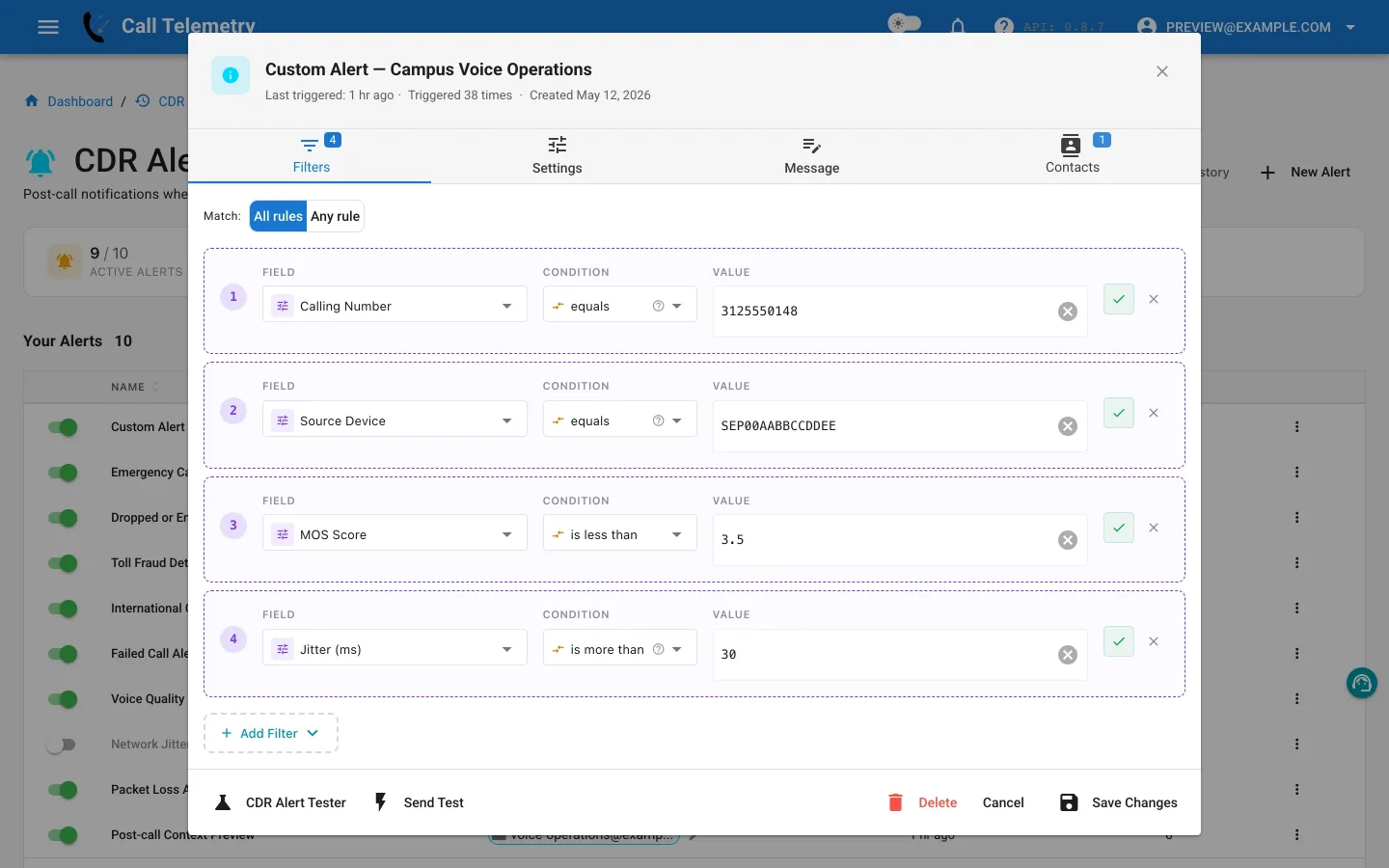
Create the profile
- Open Alerts → CDR Alerts.
- Select New Alert, then choose Custom Alert.
- Enter a clear name and select the severity used in the notification and history.
- Choose All when every rule must match, or Any when at least one rule must match.
- Add the rules, message, contacts, and tests described below before activating the alert.
Build filter rules
Each rule combines one field, one operator, and one comparison value. All is logical AND across the rules. Any is logical OR.
CDR fields
The custom-alert UI exposes these 14 CDR fields:
| Field | Typical use |
|---|---|
callingPartyNumber | Calling extension or number |
finalCalledPartyNumber | Final dialed or reached number |
originalCalledPartyNumber | Originally called number before forwarding |
origDeviceName | Originating CUCM device |
destDeviceName | Destination CUCM device |
duration | Connected duration |
destCause_value | Destination disconnect cause code |
origIpAddr | Originating media IP address |
destIpAddr | Destination media IP address |
callingPartyNumberPartition | Calling party partition |
finalCalledPartyNumberPartition | Final called party partition |
lastRedirectDn | Last redirecting directory number |
huntPilotDN | Hunt pilot directory number |
origCause_value | Originating disconnect cause code |
CMR fields
These nine fields become useful after CDR and CMR records are linked:
| Field | Measurement |
|---|---|
mos_listening_quality | Reported listening MOS |
synthetic_mos | Calculated MOS |
jitter | Jitter in milliseconds |
latency | Latency measurement |
numberPacketsLost | Lost packet count |
inferred_packet_loss_pct | Inferred packet-loss percentage |
severe_conceal_seconds | Seconds of severe concealment |
scsr_percent | Severely concealed seconds ratio |
codec | Media codec |
Caller identity, phone, switch, port, subnet, and location enrichment is available to message templates, but those values are not currently filterable.
Operators
| Operator | Behavior | Example |
|---|---|---|
equals | Exact value match | duration equals 0 |
not_equals | Value differs from one comparison value | codec not equals G.711 |
starts_with | Text begins with a prefix | finalCalledPartyNumber starts with 011 |
contains | Text includes a value | origDeviceName contains LOBBY |
in_list | Value appears in a configured list | destCause_value in 34, 38, 47 |
not_in_list | Value does not appear in a configured list | destCause_value not in 0, 16 |
greater_than | Numeric value is above the threshold | jitter greater than 50 |
less_than | Numeric value is below the threshold | mos_listening_quality less than 3.5 |
Use the value format shown by the editor. Test the rule whenever a field can arrive empty or in more than one dial-plan format.
Customize the message
Message templates use five namespaces:
| Namespace | Provides |
|---|---|
cdr.* | CDR fields and linked CMR measurements |
phone.* | Available device, location, switch, port, subnet, and discovery context |
caller.* | Resolved calling-party identity |
called.* | Called-number classification and resolved context |
alert.* | Organization, severity, trigger time, and grouped-record count |
For example:
{{ alert.severity }} alert for {{ alert.org_name }}
{{ caller.name }} ({{ cdr.callingPartyNumber }}) called
{{ cdr.finalCalledPartyNumber }} ({{ called.label }}).
Phone: {{ phone.device_description }} at {{ phone.axl_location }}
Switch: {{ phone.switch_name }} / {{ phone.port_name }}
Records in this notification: {{ alert.record_count }}
Preview the output with records representative of your dial plan. Missing enrichment should leave the notification understandable from its CDR fields alone.
phone.device_description is the phone inventory description. Free Edition may still render that inventory field in CDR Alert templates. It is not the CDR History enrichment column that Essentials unmasks.
Add contacts
Add existing or new notification contacts to the profile. Keep operational ownership clear: safety, security, telecom, and service-quality teams often need different profiles even when the underlying call could match more than one concern.
Supported routes include email, SMS, Microsoft Teams, Webex, and webhook. Configure the provider first under Appliance Notifications when required.
Test the alert
Use Send Test to confirm the configured message and email delivery. Other channels are preview-only on this path. Use Alert Lab to generate a synthetic record and run filtering, enrichment, rendering, previews, and safe delivery.
| Test Path | Teams | Webex | SMS | Webhook | |
|---|---|---|---|---|---|
| Send Test | Delivered | Preview only | Preview only | Preview only | Preview only |
| Alert Lab | Delivered | Delivered | Delivered | Safety-skipped | Safety-skipped |
Adjust the generated record until it both matches and deliberately fails the rule. That verifies the condition is selective, not merely capable of firing.
Activate and review history
- Save the profile and turn it on.
- Open Alerts → CDR Alerts → History after CUCM delivers a representative record.
- Confirm the matched-record count, rendered message, recipients, and channel result.
- Refine rules or contacts if the history shows noise, missing context, or unexpected batching.
Return to the CDR Alerts overview or compare the available built-in alert workflows.