CT-AI Capabilities
CT-AI is a conversational AI analytics layer built into Call Telemetry for Cisco Unified Communications. Ask questions in plain English — CT-AI queries your live CDRs, call quality metrics, CUBE health, and policy data, then returns answers with direct links to reports.
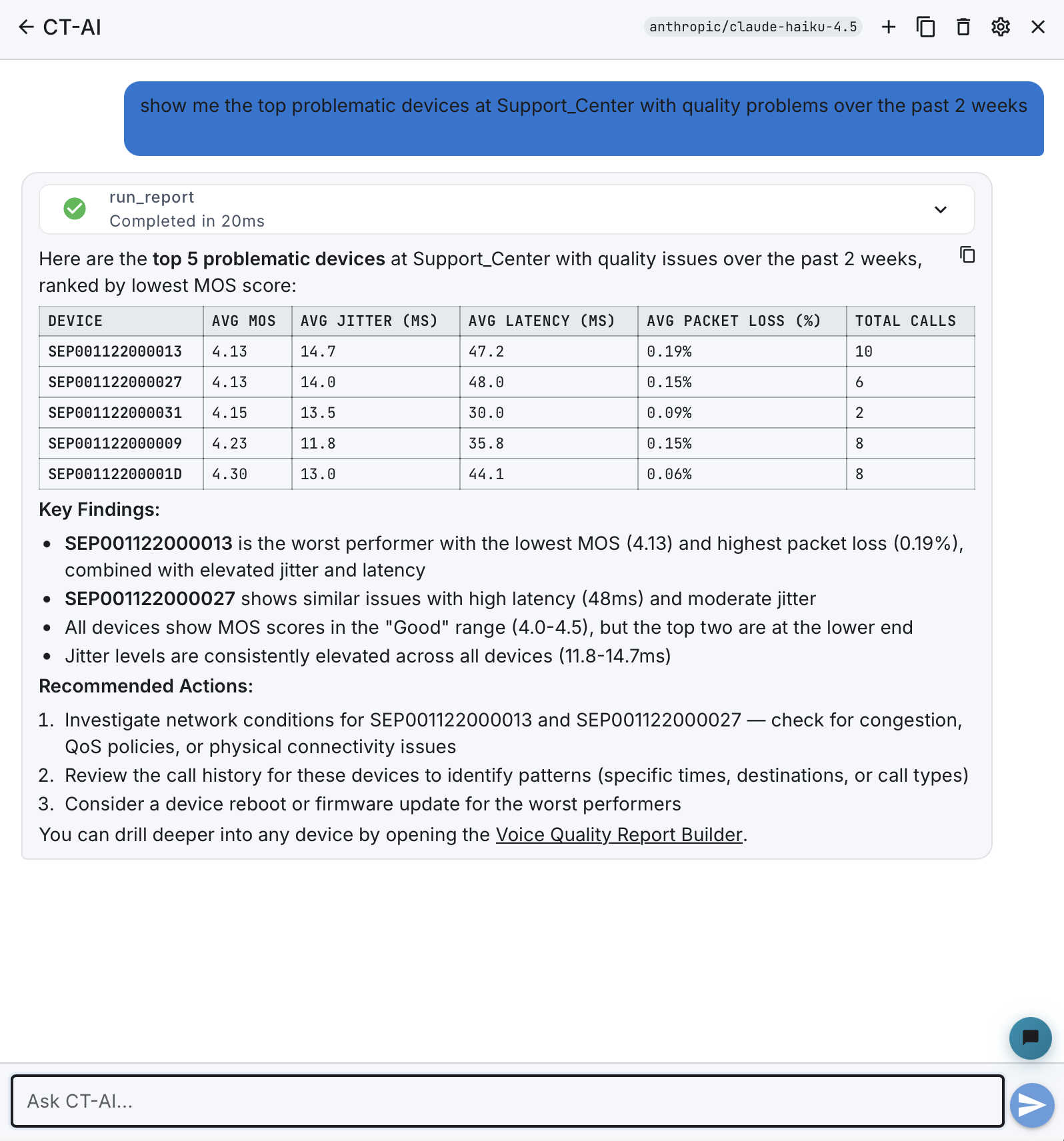
What makes CT-AI different
| Traditional Dashboard | CT-AI |
|---|---|
| Navigate to the right report | Ask a question in plain English |
| Configure filters and date ranges | CT-AI interprets "yesterday" or "past 30 days" |
| Export data to find patterns | Get summarized insights with context |
| Switch between multiple screens | One conversation covers CDRs, quality, policies, reports, and devices |
| Requires training on each report | Anyone on your team can use it immediately |
CT-AI doesn't replace your dashboards — it gives everyone on your team a faster path to the answer. When you need to go deeper, every response includes direct links to the relevant Call Telemetry reports.
Capabilities
CT-AI has 16 specialized capabilities organized by domain. The AI automatically selects the right tool for your question — just ask in plain English.
Call Records
- Search Calls — Find calls by number, time range, disconnect code, or quality threshold
"Show me all blocked outbound calls in the last 24 hours"
- Explain Call — Understand why a call succeeded, failed, or had quality issues
"Why did the call from 5551234 to 5559876 fail yesterday?"
- Explain Error — Decode SIP or Q.850 disconnect codes in plain English
"What does error code Q.850 31 mean?"
- Explain Routing — Trace the routing path of a specific call
"How was the call to 918005551234 routed?"
Devices & Quality
- Analyze Device — Health status, call quality deep dive, disconnect breakdown, and stability/flapping detection
"What's the call quality like for SEP001122334455 this week?"
- CUBE Overview — CUBE gateway health with voice quality trends, dial peer status, and actionable insights
"Analyze CUBE health for the last 24 hours"
Policy & Security
- Investigate Policy — Review a policy's match history, reputation signals, and false positive detection
"How many calls matched policy P-200 in the last week?"
- Test Rule — Dry-run a phone number against a policy rule without placing a call
"Would rule R-100 block a call to 19005551234?"
- Review Violations — Surface TDoS attacks, watch list hits, severity breakdown, and top offenders
"Show me critical security violations from today"
Reporting
- List Reports — Discover available report templates by name or category
"What report templates are available for call quality?"
- Get Report Schema — Inspect a report's dimensions, metrics, and filter operators
"What dimensions does the CDR Summary report have?"
- Run Report — Execute aggregated analytics with grouping, filtering, sorting, and top-N ranking
"Show me the top 10 callers by call count this week"
Activity & Contacts
- Summarize Activity — Call volume, quality trends, or security events with optional grouping
"Summarize today's call activity grouped by site"
- Resolve Contact — Look up caller identity from LDAP or local directories (PII-gated)
"Who owns phone number 5551234?"
Diagnostics
- Correlate Root Cause — 7-layer analysis correlating CDR failures with device state, quality, policy, reputation, and CUBE health
"Why did the call from 5551234 to 5559999 fail at 2:30 PM today?"
Analytics
- Analyze Trends — Time-series trend analysis with anomaly detection across call volume, quality, violations, and reputation
"Show me call quality trends for the past 30 days"
Report engine integration
CT-AI has direct access to Call Telemetry's report engine — the same engine that powers saved reports and scheduled exports. This means:
- Backend-synchronized report catalog available through natural language — ask for "top talkers", "quality by site", or "cost analysis" by name or description
- Grouped aggregations — "Show me call volume by hour for last week" automatically builds the right GROUP BY query
- Filtering and sorting — "Top 10 extensions by call count, excluding internal" maps to filters and ORDER BY
- Schema discovery — Ask "what dimensions does the CDR Summary report have?" and CT-AI returns the full schema so you can refine your query
Reports run through the same optimized query path as the web UI, with the same permissions and data isolation.
Conversation history
CT-AI persists your conversations so you can pick up where you left off:
- Persistent threads — Conversations are saved per user and survive page refreshes and browser sessions
- Conversation list — Browse, search, and resume recent conversations from the drawer
- Archive — Hide old conversations without deleting them
- Context carry-over — The AI remembers earlier questions in the same conversation for follow-up queries
Deep links
Every CT-AI response includes deep links back into the Call Telemetry UI. When the AI finds a problematic call, device, or policy, you can click through directly to:
- CDR History and Call Detail pages
- Phone Dashboard and Call Quality reports
- Policy Analytics and Rule configuration
- CUBE Overview and dial peer status
- Saved Reports with pre-applied filters
- Contact and EndUser detail pages
Deep links carry the relevant parameters (time range, device name, filter values) so the destination page shows exactly what the AI was referencing.
Sandboxed execution
CT-AI runs in a strict sandbox. The LLM never has direct access to your database, file system, or network — it can only invoke the predefined, read-only capabilities listed above.
| Boundary | Enforcement |
|---|---|
| No raw SQL or database access | The LLM invokes structured Jido Actions, not queries. Each action has a schema-validated input contract. |
| No code execution | No shell commands, no eval, no file system access. The AI module contains zero system-level operations. |
| Read-only operations | All 16 capabilities are read operations. CT-AI cannot write, delete, or modify any data. |
| Schema-validated inputs | Every parameter the LLM passes is validated against a NimbleOptions schema before execution. Invalid inputs are rejected. |
| Per-org data isolation | Every query is scoped to org_id. One organization's AI cannot see another organization's data. |
The LLM's role is to understand your question, select the right capability, and explain the results — not to access infrastructure directly.
Privacy and security
CT-AI is designed with privacy as a first-class concern:
- PII Redaction — Phone numbers, caller IDs, and device names can be redacted before data reaches any LLM. Redaction is configurable per organization.
- Bring Your Own LLM — Choose your provider and keep your API keys under your control. CT-AI supports cloud APIs and fully on-premises deployments.
- Audit Ledger — Every AI interaction is logged with token usage, tool calls, and response content for compliance review.
- No training on your data — CT-AI queries your data at runtime. Nothing is sent to LLM providers for model training.
- On-premises option — Deploy with Ollama and no data ever leaves your network perimeter.
See the Security & PII Guide for configuration details.
Cost controls
CT-AI includes built-in cost management to prevent surprise bills from LLM providers:
| Control | Description |
|---|---|
| Daily cost limit | Set a per-org USD cap. CT-AI stops processing when the limit is reached. |
| Max tokens per day | Hard ceiling on total token consumption per organization. |
| Max tool calls per turn | Limit how many tools the AI can invoke in a single response (default: 10). |
| Usage dashboard | Track token consumption and cost by day, provider, and model. |
Cost controls are configured in Settings > AI > Cost Controls and apply organization-wide.
Supported LLM providers
| Provider | Models | Deployment |
|---|---|---|
| OpenAI | GPT-4o, GPT-4o-mini | Cloud API |
| Anthropic | Claude Sonnet, Claude Haiku | Cloud API |
| OpenRouter | 100+ models (DeepSeek, Llama, Mixtral, etc.) | Cloud API (aggregator) |
| Azure OpenAI | Your Azure-hosted models | Cloud (your tenant) |
| Ollama | Llama 3, Mistral, Qwen, and more | Self-hosted / on-premises |
Switch providers at any time — no lock-in. Configure your provider in Settings > AI Configuration or via the API.
MCP protocol support
CT-AI capabilities are available via the Model Context Protocol (MCP) — the open standard for connecting AI assistants to external tools. Use CT-AI from:
- Claude Desktop — Add Call Telemetry as an MCP server
- Cursor IDE — Query your call data while coding
- Any MCP-compatible client — Same 16 capabilities, any interface
Install from npm:
npm install -g @calltelemetry/ct-ai-mcp
Or run directly with npx (no install required):
npx @calltelemetry/ct-ai-mcp
See the MCP Integration section of the Getting Started guide for full setup instructions.
Requirements
- Call Telemetry Server 0.8.6 or later
- At least one LLM provider configured (see Getting Started: Admin Setup)
- CDR Integration — active CDR/CMR data flowing into Call Telemetry for best results
- CURRI Policy Integration (optional) — for policy investigation and violation analysis
- CUBE XCC Integration (optional) — for CUBE gateway health and SIP quality analytics
- Premium or Demo license required
Next steps
- Getting Started — Set up CT-AI and ask your first question
- Security & PII — PII redaction and audit configuration