Watch Lists: Detect and Block Robocalls and Spam
Feature Overview
Watch Lists track calling numbers that exceed call-volume thresholds. Operators can review those numbers, receive alerts, and optionally block future calls from them.
These are your ordinary Call Telemetry policies. In 0.8.8, you can attach those same policy objects to a trigger in two separate ways: count calls handled by selected policies toward the threshold, and/or block listed numbers when they hit selected policies later.
Key capabilities:
- Threshold-based detection — Call count and time window unique to your environment
- Same policies, two attachments — Count traffic for a trigger, and/or block listed numbers on later calls
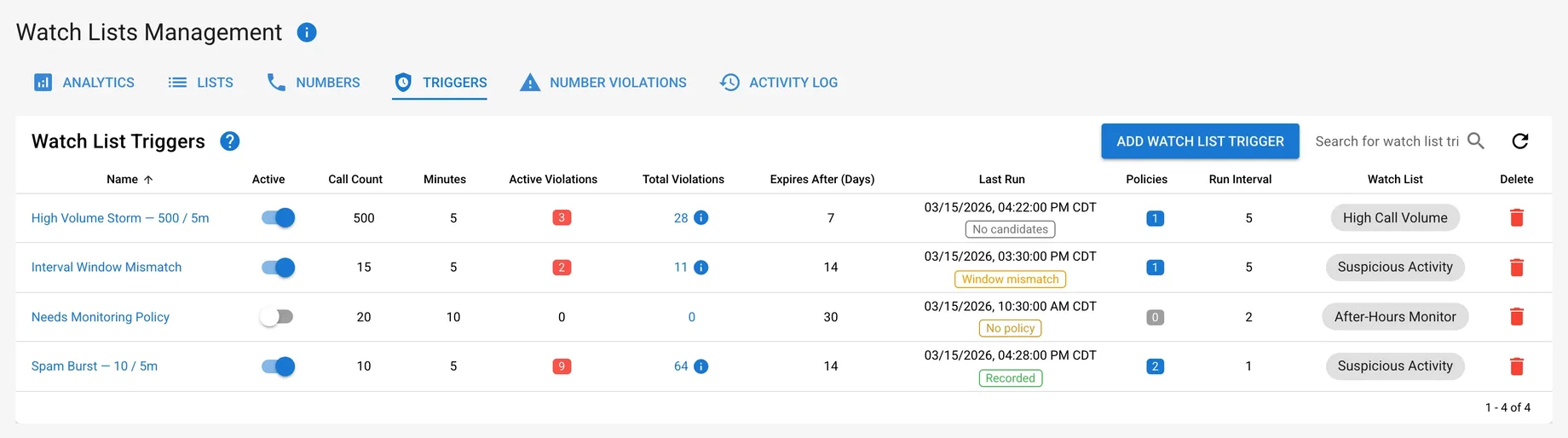
- Last-run outcomes — See whether a trigger recorded violations, found no candidates, skipped, or failed
- Real-time alerts — Email when callers exceed thresholds
- Flexible enforcement — List first, turn on blocking when ready
- Full audit trail — Comments, violation history, and forensic reporting
Requirements
- Call Telemetry Appliance 0.8.8 or later
- Call Telemetry Advanced License or Demo License
- Cisco CallManager with CURRI Integration
- Configured External Call Control Profile Inspection — A route pattern, translation pattern, or phone extension must be enabled for Call Telemetry Policy inspection
How Watch Lists Work
A watch list is just a list of calling numbers. A trigger counts how often a number calls in a time window. When it crosses the threshold, the trigger adds the number to the list.
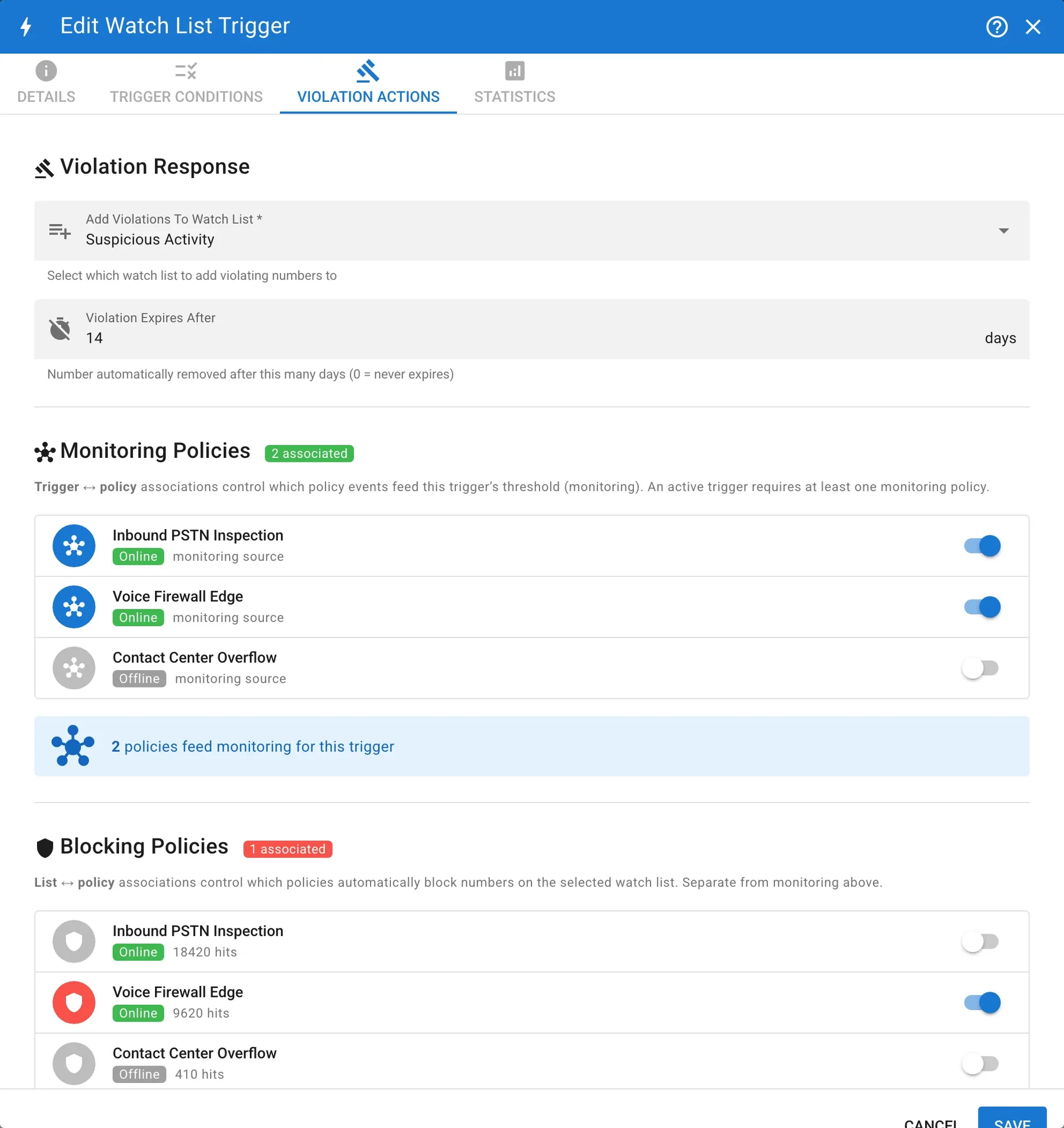
On Trigger Conditions and Violation Actions, you attach the same policy objects for two separate purposes:
- Include calls handled by — Select the policies whose handled calls count toward this trigger. An active trigger needs at least one.
- After a number is added to
<list>— Choose Don’t block or Block using selected policies. The selected block policies apply to the destination list as a whole, not only to this trigger.
The two attachments are independent. Editing a trigger’s Include calls handled by selection does not change the destination list’s block policies. Likewise, choosing Don’t block clears blocking for that list, but does not remove the trigger’s count policies.
Call flow
- A call hits a policy (for example inbound PSTN).
- If that policy is selected under Include calls handled by, the call is counted.
- Over the threshold → the number is added to the destination watch list.
- On a later call, if that policy (or another) is selected under Block using selected policies for the destination list, the call can be rejected.
You can stop after step 3 and review numbers before enabling blocking.
The policy editor shows the same relationships in reverse. Calls counted by triggers lists triggers that count calls handled by the policy. Lists blocked by this policy lists destination watch lists whose list-global block policy set includes the policy. These are views of the same two relationships, not separate policy types.
Trigger settings
| Setting | What it does |
|---|---|
| Call Count Threshold | The number of calls that causes a violation. |
| Time Window | The period in which calls are counted. |
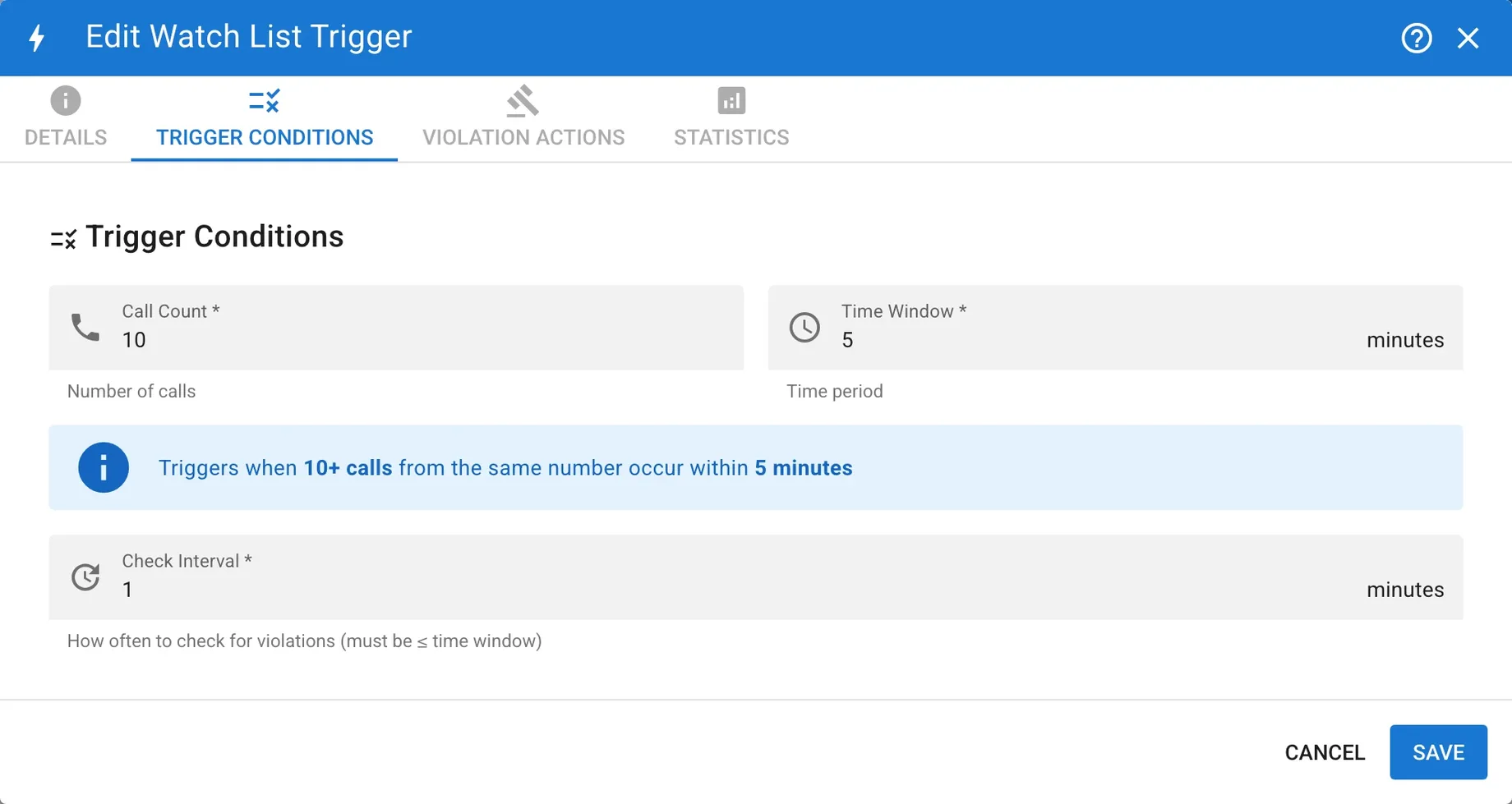
| Check Interval | How often the trigger runs. It must be less than or equal to the time window. |
| Target Watch List | The watch list that receives numbers that exceed the threshold. |
| Expire After X Days | How long a number remains on the list. Set it to 0 for no expiration. |
| Include calls handled by | Which of your policies contribute calls to this trigger’s count |
| Block using selected policies | Which of your policies reject numbers already on the destination list |
If Check Interval is greater than Time Window, the save is rejected with interval_exceeds_window. A trigger must run at least once during its evaluation window so it does not miss short bursts.
Last-run outcomes
Use the last-run outcome badge to distinguish a successful run with no violations from a skipped or failed run:
| Outcome | Meaning |
|---|---|
| Recorded | The run recorded one or more violations. |
| No candidates | The run completed, but no numbers exceeded the threshold. |
| No policy | Skipped — no policy is attached for counting |
| Window mismatch | The check interval exceeds the time window, so short bursts may be missed. Correct the trigger settings. |
| No license | The run was skipped because an Advanced license was unavailable. |
| Error | The run failed. |
Example: Monitor without blocking
Start without blocking when you want to learn normal call patterns before enforcing a threshold.
Configuration:
- Call Count Threshold: 10 calls
- Time Window: 5 minutes
- Check Interval: 1 minute
- Target Watch List: Suspicious Activity
- Expire After: 14 days
- Include calls handled by: inbound PSTN (count only)
- After a number is added to
<list>: Don’t block
What happens:
- Calls from +1-555-123-4567 pass through the inbound policy and count toward the trigger.
- The number exceeds the configured threshold.
- The trigger adds the number to the Suspicious Activity watch list.
- Administrators receive an email alert if email is enabled.
- An operator reviews the number and can add a comment, block it globally, whitelist it, or delete it.
- The number expires after 14 days unless it is removed sooner.
Example: Monitor and block
Use higher thresholds with list blocking enabled for obvious spam storms.
Configuration:
- Call Count Threshold: 500 calls
- Time Window: 5 minutes
- Check Interval: 5 minutes
- Target Watch List: High Call Volume
- Expire After: 7 days
- Include calls handled by: the inbound policy (count)
- After a number is added to
<list>: Block using selected policies — the same inbound policy, or an edge policy, if you want listed numbers rejected there
What happens:
- Calls from +1-555-123-4567 pass through the inbound policy and count toward the trigger.
- The number exceeds 500 calls in the 5-minute window.
- The trigger adds the number to the High Call Volume watch list.
- On later calls, policies you attached for blocking reject the number while it remains on the list.
- Administrators receive an email alert if email is enabled.
- The number expires after 7 days unless it is removed sooner.
Configuring Watch Lists
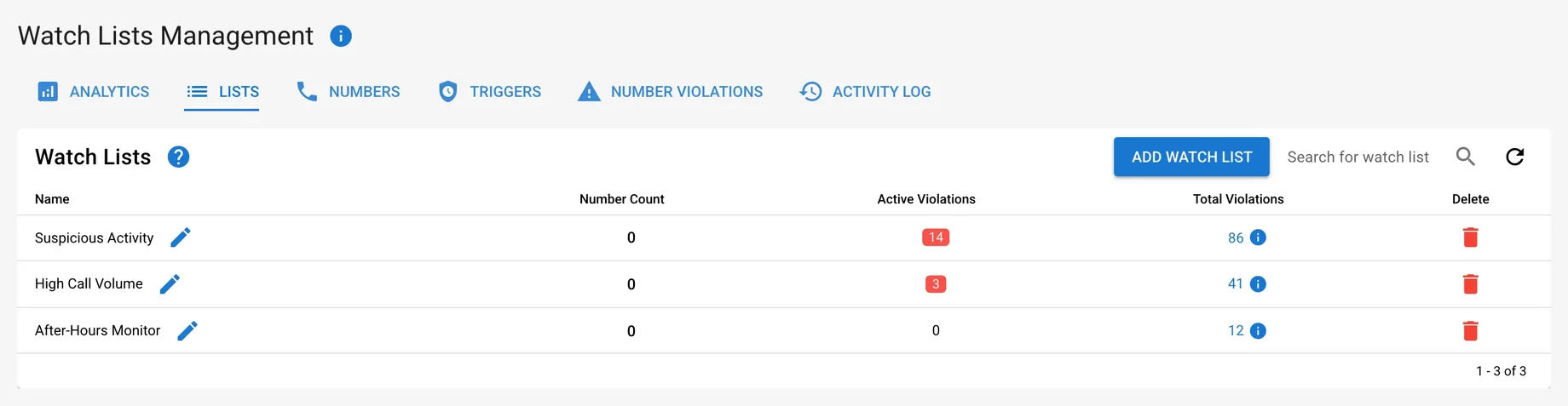
Create a Watch List
- Navigate to Policies → Watch Lists in the Call Telemetry Server.
- Open the Lists tab.
- Click Add Watch List and enter a name.
Create a Trigger
- Open Policies → Watch Lists, then select the Triggers tab.
- Click Add Watch List Trigger.
- On Details, name the trigger. New triggers are saved as inactive so you can finish the configuration before enabling them.
- On Trigger Conditions, set the call count threshold, time window, and check interval. Keep the check interval less than or equal to the time window.
- On Violation Actions, select the destination watch list and expiration.
- Under Include calls handled by, pick which of your existing policies should feed this trigger’s count. At least one is required before you can activate the trigger.
- Under After a number is added to
<list>, choose Don’t block or Block using selected policies. If you choose Block using selected policies, select the policies that should reject numbers on the destination list. This block choice is list-global and is independent of the trigger’s count selection.
- Enable and save the trigger.
- After its next scheduled check, confirm the last-run outcome. No candidates means the trigger ran successfully but no number exceeded the threshold. No policy, Window mismatch, No license, or Error needs attention.
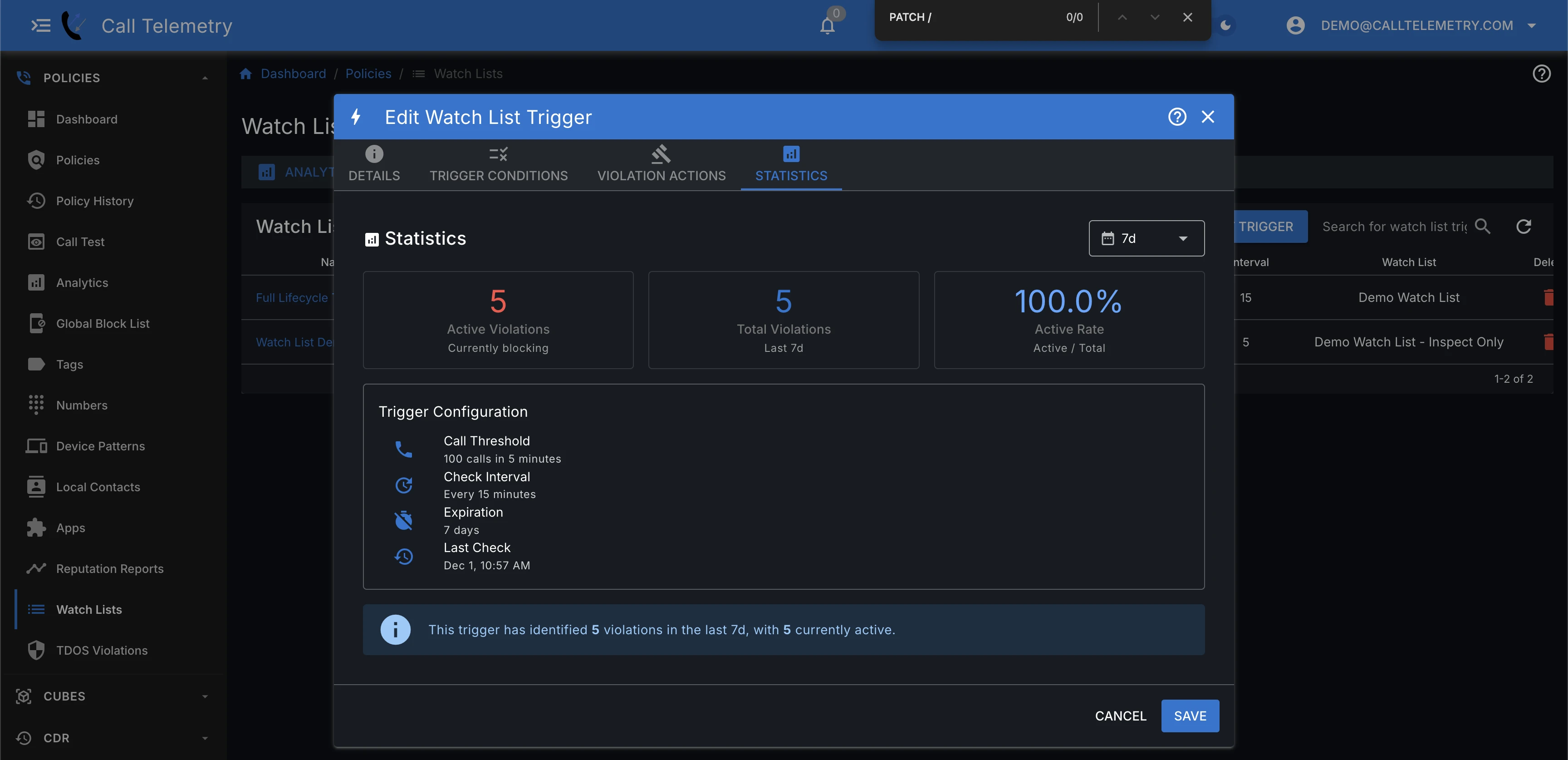
Trigger Statistics
Review active vs total violations, hit rate, and the configuration summary to tune thresholds.
Managing Watched Numbers
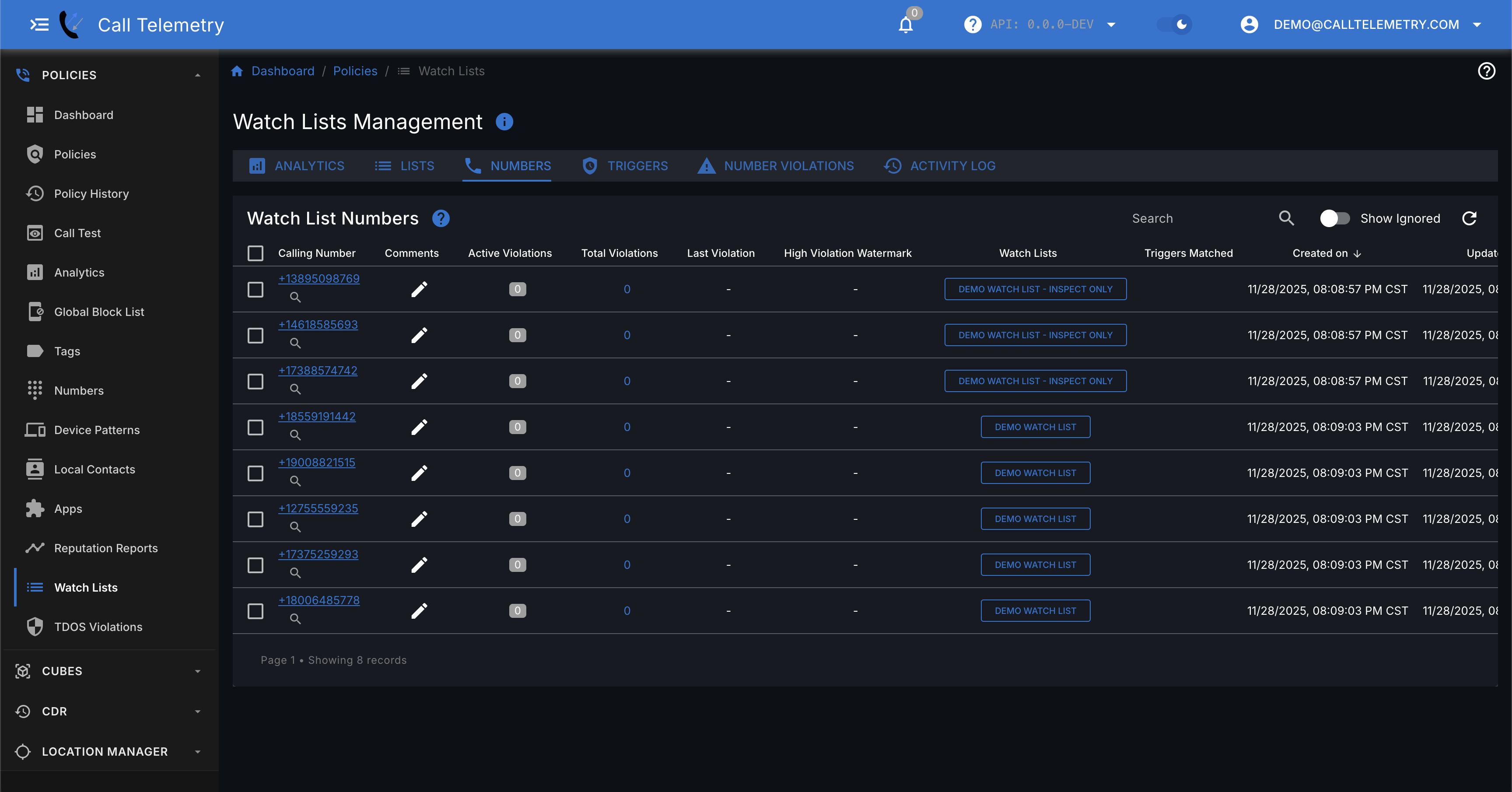
A number appears here after an active trigger records a violation and adds it to the destination watch list. Being on a watch list does not by itself mean the number is blocked.
Watch List Numbers
Open Watch List Numbers to review numbers added by triggers.
Taking Actions on Watched Numbers
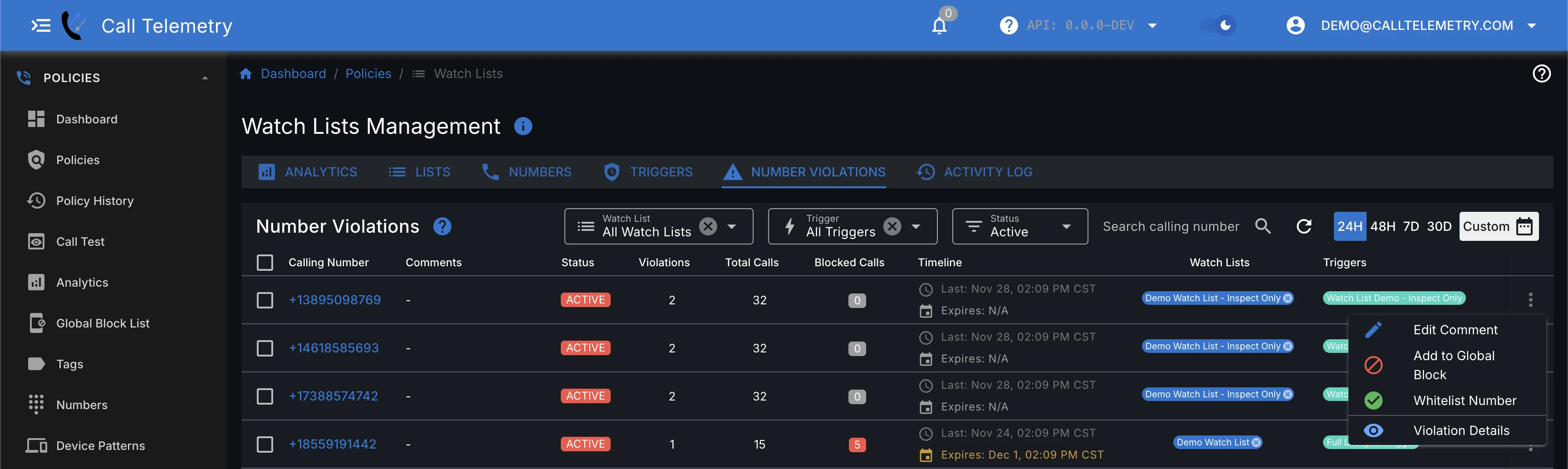
You can take the following actions on a watched number:
- Add Comment: Annotate the number for investigation and audit.
- Global Block: Add the number to the Global Blocked Call List.
- Whitelist: Ignore this number in future triggers.
- Delete Number: Remove from the watch list (may be re-added if triggered again).
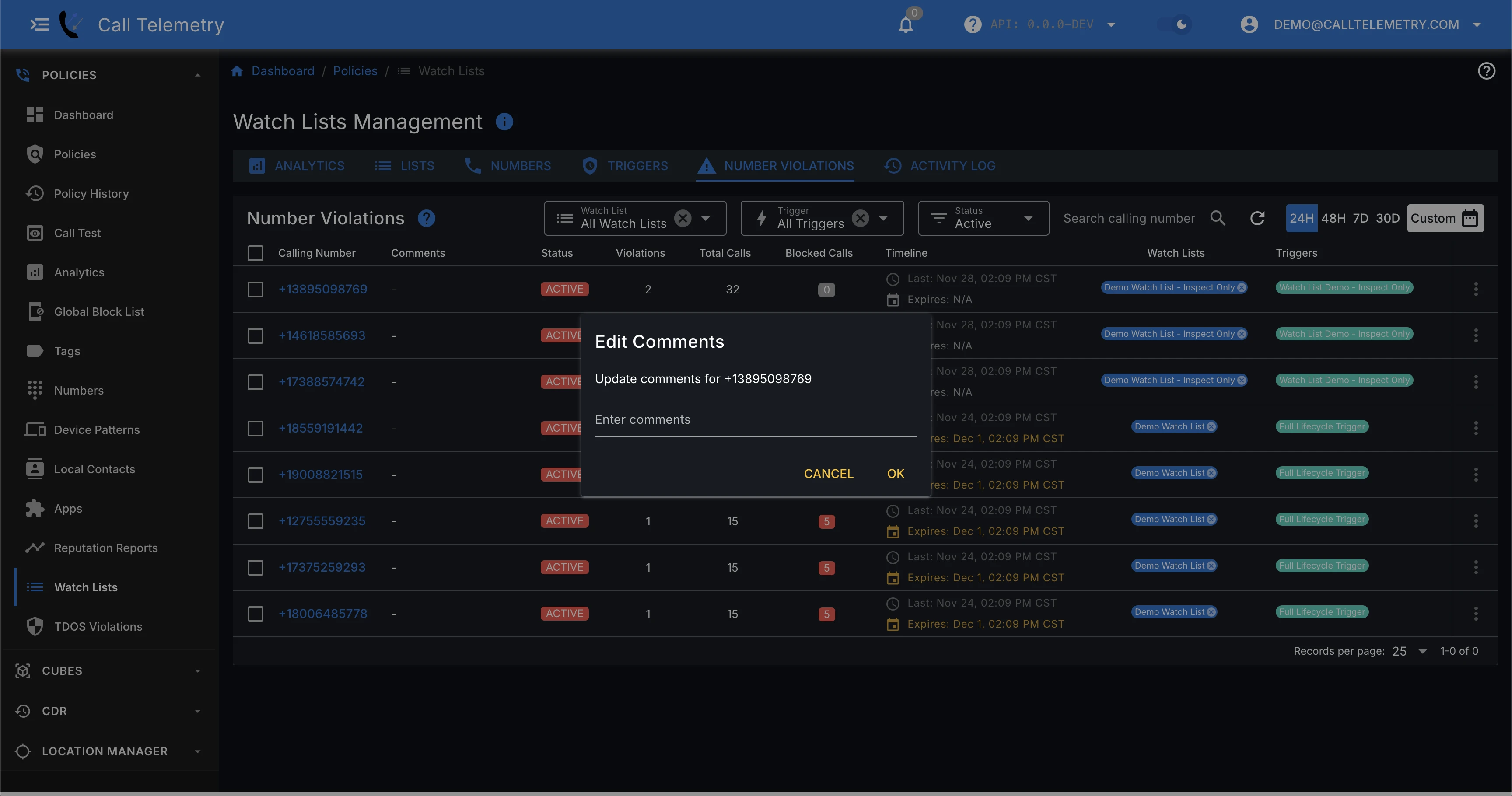
Adding Comments
Click the pencil icon next to any number to add investigation notes or context.
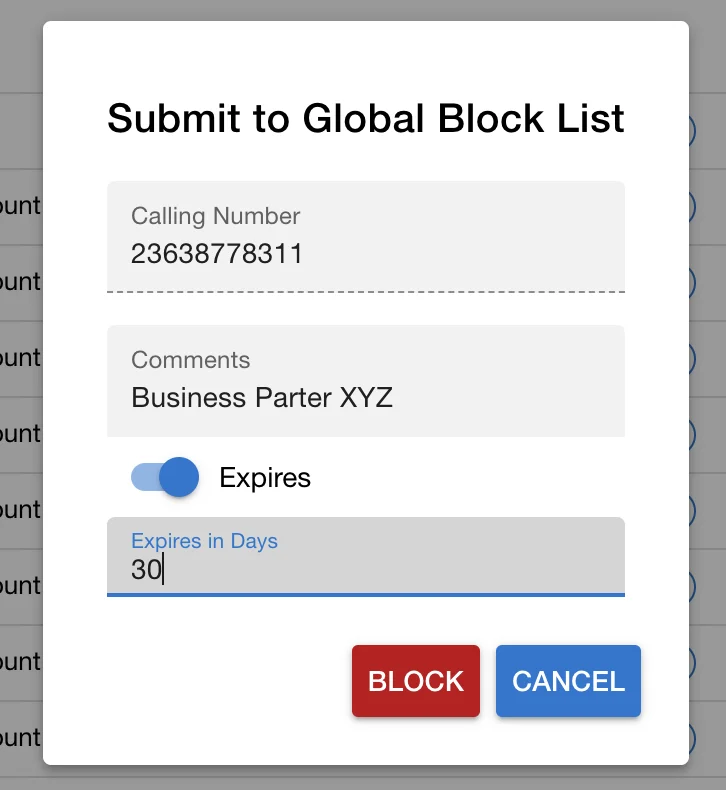
Blocking with Expiration
When blocking a number, you can set it to auto-expire after a number of days:
- On the Submit Blocked Number dialog, toggle the slider to enable expiration.
- Set the number of days you want the block to last.
Viewing Watch List Relationships From a Policy
The policy editor’s Watch lists card is a reverse view of the trigger and list relationships:
- Calls counted by triggers shows the triggers that include this policy under Include calls handled by.
- Lists blocked by this policy shows the destination lists whose list-global block policy set includes this policy.
These views do not create a third attachment type. A policy can count calls for one trigger and block numbers on a list independently. Later changes to a trigger’s count policies do not rewrite that list’s block policy set.
Analytics and Reporting
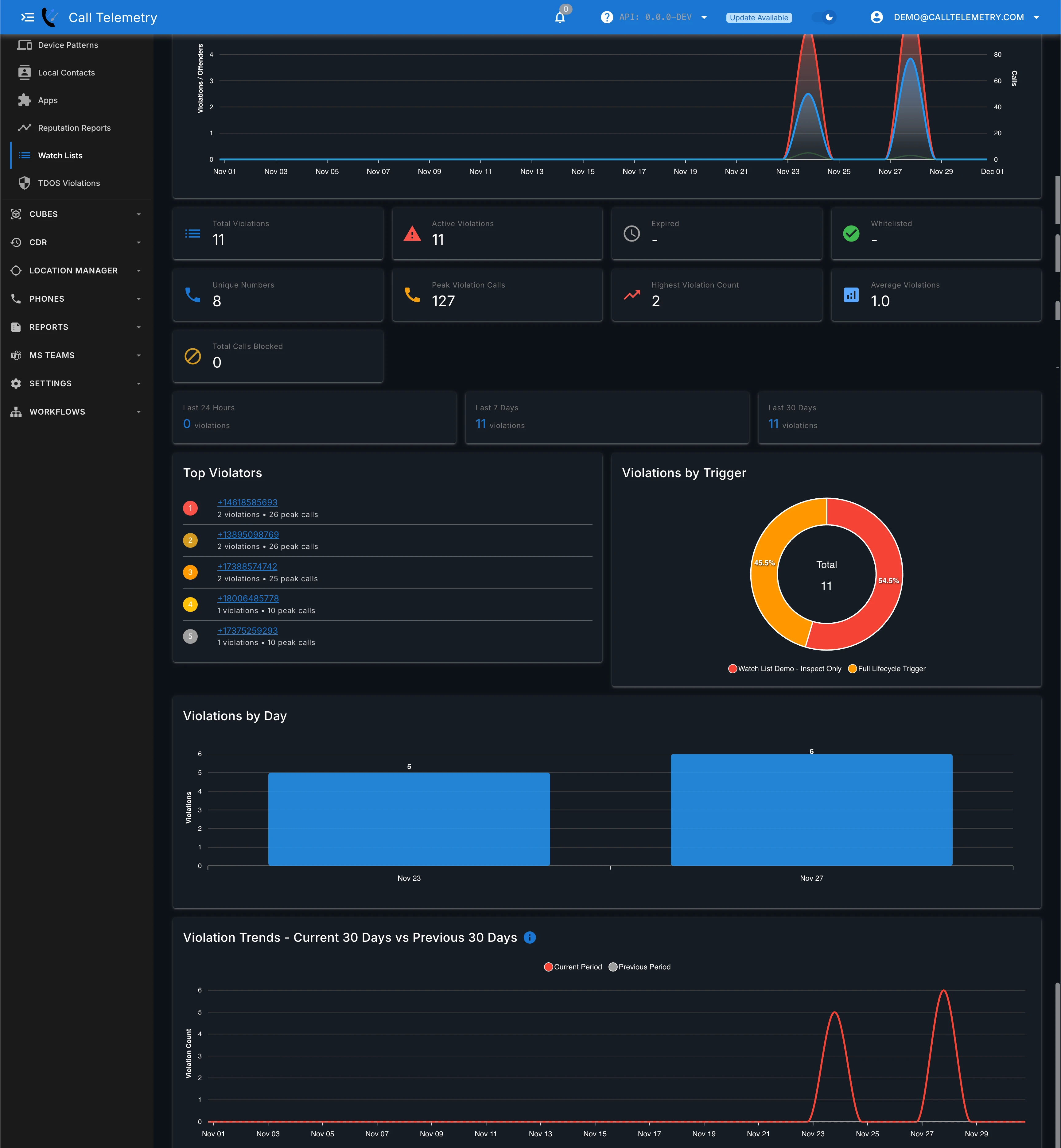
Watch List Analytics
Use the Analytics tab to trend violations over time. Filter by watch list and time window to see spikes in violations, top violators, violation counts by trigger, and day-over-day trends.
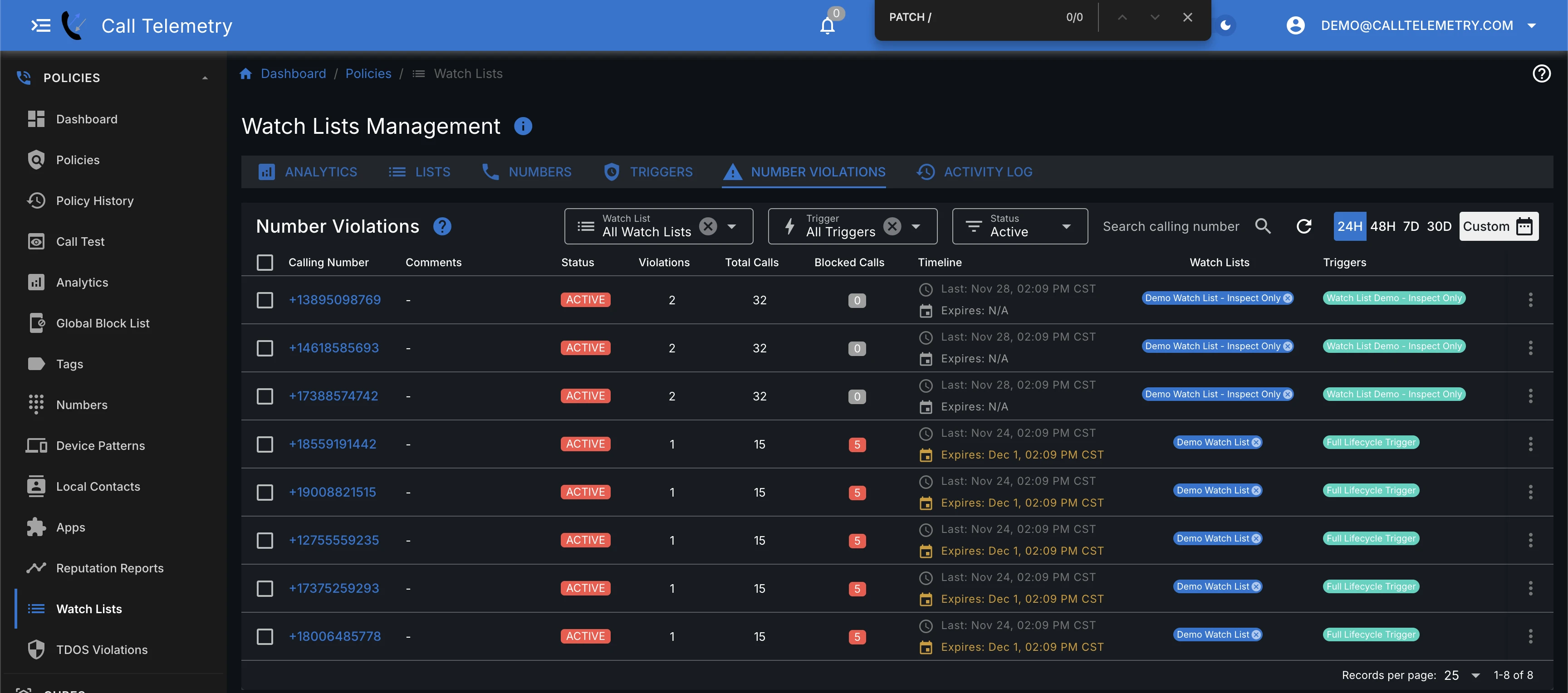
Number Violations
Use the Number Violations tab to see callers that hit your triggers, along with call counts, blocked calls, expiration, and which watch list/trigger caught them.
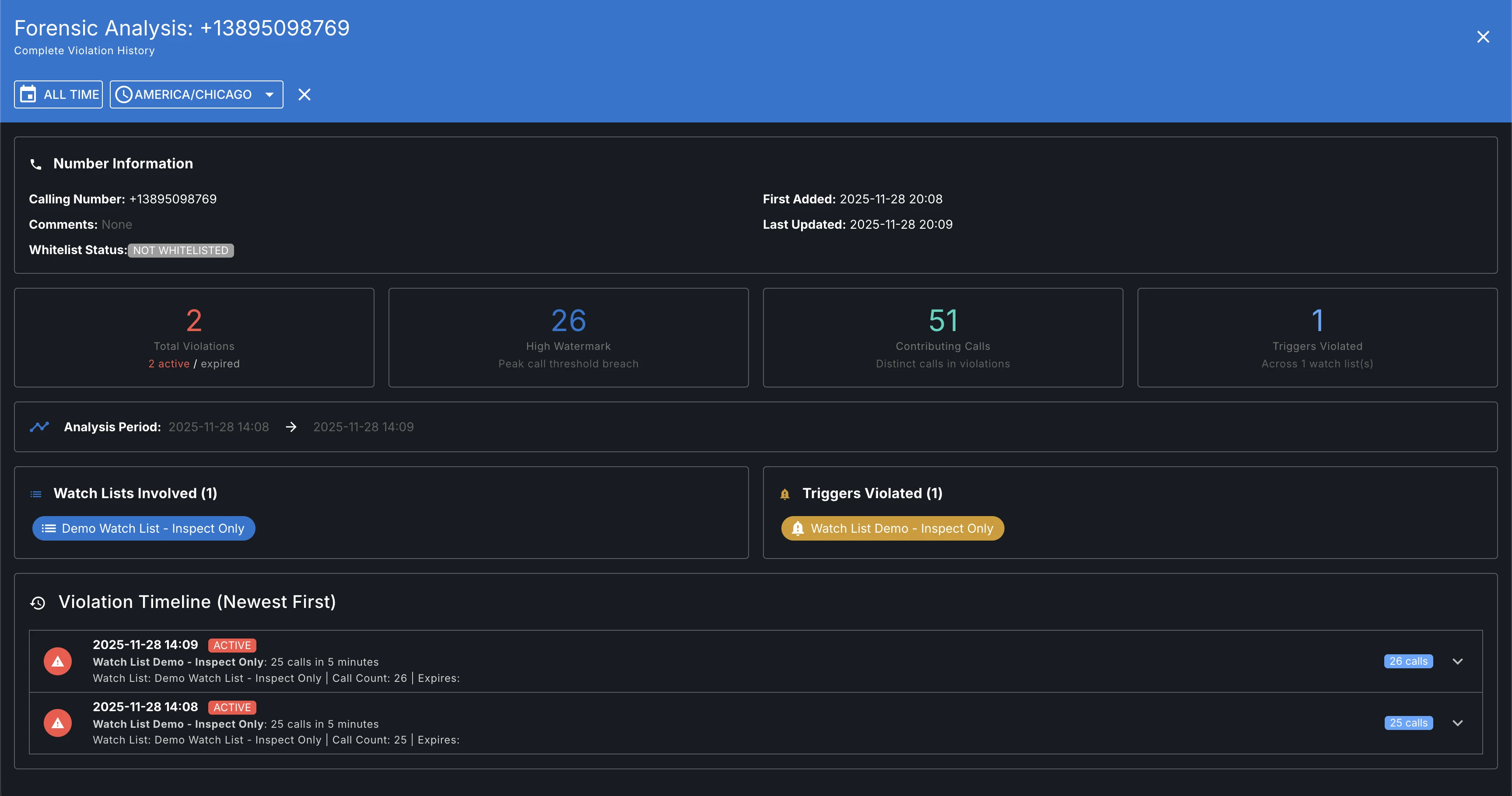
Violation Audit and Timeline
Drill into a specific number to see its complete violation history: involved watch lists, violated triggers, call counts, peak thresholds, whitelist status, and a chronological timeline of violations.
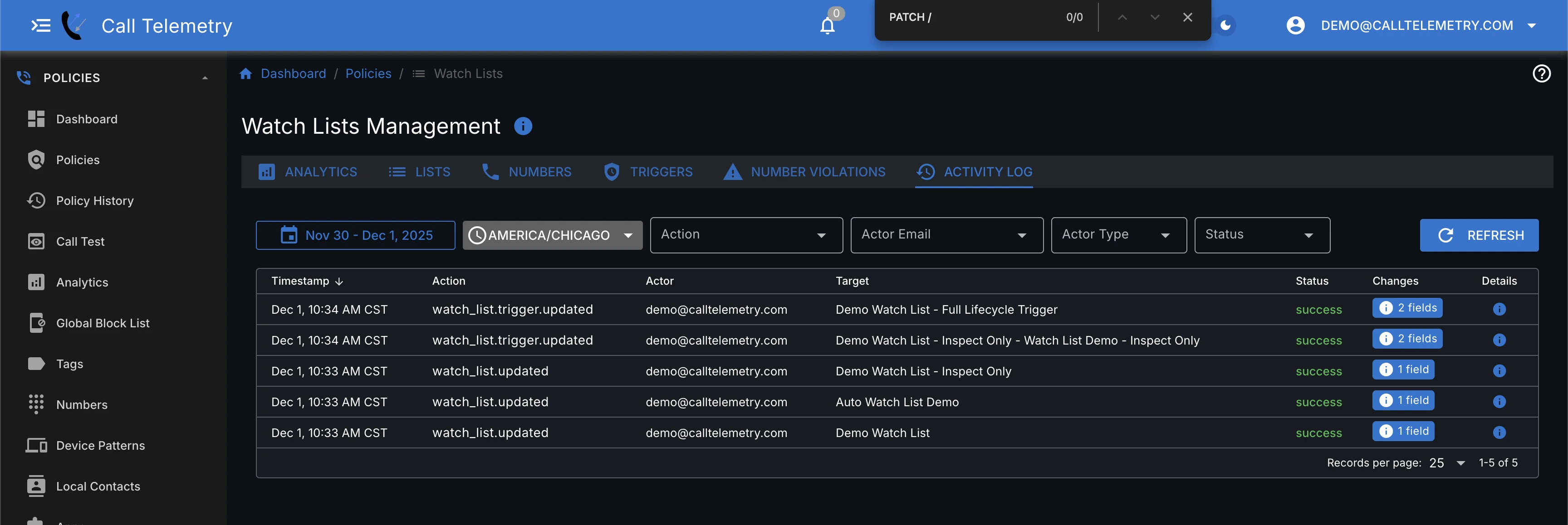
Activity Log
The Activity Log records every change to watch list objects, triggers, and number violations, plus system-level actions. Use filters for actor, action, status, and time windows to audit who changed what.
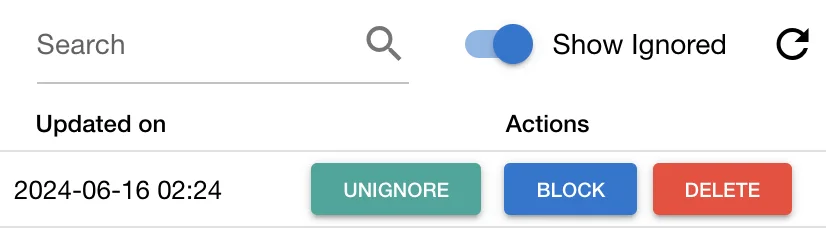
Managing Ignored Numbers
Ignored numbers are hidden by default. Turn on Show Ignored in the upper-right corner to view them.
Email Alerts
Trigger Run Alerts
When an email-enabled trigger adds new numbers to a watch list, Call Telemetry sends an alert to system administrators.
The email alert includes:
- Trigger Details: Call count threshold, interval, scheduled run time, and last run window.
- Summary: New and recurring violations, high-water call count, 24-hour statistics.
- New Violations: Numbers exceeding threshold for the first time.
- Recurring Violations: Numbers that have violated before with total violation counts.
- Top Blocked Numbers: Highest volume callers in the last 24 hours.
Example Trigger Run Alert:
Subject: Watch List Trigger Alert - Spam Watch (Org 1)

Watch List Trigger Alert - Spam Watch

Trigger Details:
Call Count Threshold: 10
Interval (minutes): 5
Scheduled Run Time: 5 minutes
Last Run Window: 2025-12-01T21:30:00Z to 2025-12-01T21:35:00Z

Summary:
- New violations: 2
- Recurring violations: 3
- High-water call count this run: 18
- Expired violations this run: 1
- Total violations last 24h: 14
- Unique numbers last 24h: 6
- Total calls last 24h: 37
- Active violations last 24h: 9
- Inactive (expired) last 24h: 5

New Violations (First Occurrence):
+1 555 120 3344 (11 calls)
+1 555 447 8899 (10 calls)

Recurring Violations:
+1 555 777 0001 (18 calls, total violations: 4)
+1 555 444 2222 (12 calls, total violations: 3)
+1 555 333 1111 (10 calls, total violations: 2)

Numbers Blocked in Last 24h (top 20):
+1 555 777 0001 (34 calls in last 24h)
+1 555 444 2222 (18 calls in last 24h)
+1 555 333 1111 (15 calls in last 24h)
+1 555 120 3344 (11 calls in last 24h)
+1 555 447 8899 (10 calls in last 24h)

Watch List Inspection (recent active):
+1 555 777 0001 (18 calls) at 2025-12-01T21:33:00Z
+1 555 444 2222 (12 calls) at 2025-12-01T21:32:00Z
+1 555 333 1111 (10 calls) at 2025-12-01T21:31:00Z
Nightly Daily Report
A daily summary report is sent at midnight UTC for each watch list with email-enabled triggers, providing a 24-hour overview even if no new violations occurred.
Example Daily Report:
Subject: Watch List Daily Report - Spam Watch (Org 1)

Watch List Daily Report - Spam Watch
Window: 2025-12-01 00:00:00Z → 2025-12-02 00:00:00Z

Summary:
- Total violations last 24h: 14
- Unique numbers last 24h: 6
- Total calls last 24h: 37
- Active violations last 24h: 9
- Inactive (expired) last 24h: 5
- High-water call count last 24h: 12

Numbers Blocked in Last 24h (top 20):
+1 555 123 4567 — 12 calls
+1 555 987 6543 — 8 calls
+1 555 765 4321 — 5 calls

Watch List Inspection (recent active):
+1 555 123 4567 — 12 calls at 2025-12-01T22:41:00Z
+1 555 987 6543 — 8 calls at 2025-12-01T21:05:00Z
+1 555 765 4321 — 5 calls at 2025-12-01T18:30:00Z
Quick Start: Monitor First, Block Later
Start by listing numbers. Turn on blocking after you trust the threshold.
- Create a watch list (Policies → Watch Lists → Lists).
- Add a trigger: threshold, window, and check interval. Leave it inactive at first.
- Under Include calls handled by, attach the inbound policy so those calls are counted.
- Select Don’t block under After a number is added to
<list>. Enable the trigger. - Watch last-run outcomes, alerts, and the numbers list for a few days.
- When you want listed numbers rejected, choose Block using selected policies and select the policies under After a number is added to
<list>.
Related Features
Watch Lists are one layer of Call Telemetry's Voice Security stack:
| Feature | Use Case | How Long to Block Callers |
|---|---|---|
| Reputation Scores | Block known robocalls before they ring | Pre-call |
| TDoS Protection | Stop active denial-of-service attacks | Seconds |
| Watch Lists | Detect patterns and investigate callers | Minutes to hours |
| Global Block List | Permanently block confirmed bad actors | Permanent |