Microsoft Teams Reporting & Analytics
Call Telemetry delivers unified reporting and analytics for Microsoft Teams Phone, Direct Routing, Auto Attendants, and Call Queues. By combining Microsoft Graph API data feeds with native CDR processing, Call Telemetry provides enterprise visibility into call quality, trunk utilization, licensing costs, and agent performance.
For interactive samples with downloadable CSV, XLSX, and PDF exports, see Teams Report Examples.
The 33 Microsoft Teams Report Templates
Call Telemetry includes 33 purpose-built report templates designed specifically for Microsoft Teams environments. These templates cover operational monitoring, financial chargeback, quality assurance, and voice application management:
Direct Routing, PSTN Usage & Trunking
| Template ID | Name & Description | Primary Use Case |
|---|---|---|
ms_teams_pstn_usage | PSTN Usage Summary Aggregates inbound and outbound PSTN calls, durations, and costs across calling plans and Direct Routing. | Carrier billing reconciliation and minutes auditing. |
ms_teams_direct_routing_usage | Direct Routing Usage Detailed breakdown of sessions traversing Direct Routing SBC connections. | Trunk sizing and peak concurrent call tracking. |
ms_teams_sbc_trunk_health | SBC Trunk Health Monitors SIP response codes, session attempts, and availability across session border controllers. | SBC gateway uptime and interconnect monitoring. |
ms_teams_sbc_trunk_quality | SBC Trunk Quality Evaluates jitter, round-trip time, and packet loss on SBC media legs. | Carrier network SLA verification. |
Call Detail & Records
| Template ID | Name & Description | Primary Use Case |
|---|---|---|
ms_teams_call_detail | Teams Call Detail Records Comprehensive session-level log of 1:1, conference, and PSTN calls with participant endpoints. | Call forensic investigations and compliance audits. |
ms_teams_missed_calls_voicemail | Missed Calls & Voicemail Identifies unanswered inbound calls, routing destinations, and voicemail deposits. | User responsiveness and customer callback auditing. |
ms_teams_alerts_feed | Teams Alerts Feed Chronological stream of policy violations, threshold alerts, and emergency notifications. | Security incident response and alerts log. |
Call Quality & Network Performance
| Template ID | Name & Description | Primary Use Case |
|---|---|---|
ms_teams_call_quality_overview | Call Quality Overview High-level executive metrics for good vs. poor call percentages, stream classifications, and MOS scores. | UC service health tracking. |
ms_teams_call_quality_hourly_v1 | Hourly Call Quality Distribution Hourly breakdown of stream degradation, identifying network congestion peaks throughout the day. | Correlating voice degradation with enterprise LAN/WAN load. |
ms_teams_video_quality_overview | Video & Screen Sharing Quality Metrics on frame rate drops, video packet loss, and presentation resolution degradation. | Meeting room and executive presentation quality analysis. |
Voice Applications: Auto Attendants
| Template ID | Name & Description | Primary Use Case |
|---|---|---|
ms_teams_auto_attendant_directory | Auto Attendant Directory Configuration inventory of all provisioned Auto Attendants, menu structures, and dial keys. | Architecture audit and IVR tree mapping. |
ms_teams_auto_attendant_historical_summary | Auto Attendant Historical Summary Aggregated call volume, operator transfers, and menu option selections over custom date ranges. | Evaluating menu navigation efficiency and routing bottlenecks. |
ms_teams_auto_attendant_analytics_daily | Daily Auto Attendant Analytics Day-over-day call volume, caller abandonment within menu flows, and peak calling hours. | Capacity planning and schedule optimization. |
ms_teams_auto_attendant_realtime_overview | Auto Attendant Real-Time Overview Live snapshot of active calls navigating Auto Attendant greetings and menus. | Real-time operations center monitoring. |
Voice Applications: Call Queues & Agents
| Template ID | Name & Description | Primary Use Case |
|---|---|---|
ms_teams_call_queue_directory | Call Queue Directory Inventory of all Call Queues, assigned resource accounts, distribution lists, and routing methods. | Queue configuration hygiene and audit. |
ms_teams_call_queue_historical_summary | Call Queue Historical Summary Multi-day rollup of offered calls, answered calls, abandoned calls, and average wait times. | Long-term contact center performance review. |
ms_teams_call_queue_hourly_summary | Hourly Queue Traffic Distribution Hourly breakdown of call volume and wait times by queue. | Identifying staffing gaps and shift adjustments. |
ms_teams_call_queue_analytics_daily | Daily Call Queue Analytics Day-by-day comparison of queue performance metrics against organizational targets. | Daily operations KPI tracking. |
ms_teams_call_queue_sla_daily | Queue Service Level Agreement (SLA) Percentage of calls answered within defined target wait thresholds (e.g., 80% answered within 20 seconds). | Formal SLA compliance auditing. |
ms_teams_call_queue_outcomes_daily | Queue Call Outcomes Distribution of call terminations: answered, disconnected by caller, overflowed, or timed out. | Analyzing why callers abandon queues. |
ms_teams_call_queue_problem_queues_daily | Problem Queues Report Surfaces queues exceeding abandonment or wait-time thresholds. | Exception-based management for queue managers. |
ms_teams_call_queue_staffing_daily | Queue Staffing & Availability Correlates call volume with logged-in agent counts and queue opt-in status. | Optimizing agent scheduling vs. queue demand. |
ms_teams_call_queue_final_state_action_summary | Final State Routing Action Summary of terminal call actions (transferred to external number, sent to voicemail, disconnected). | Audit of overflow and after-hours call routing. |
ms_teams_queue_realtime_overview | Near-Real-Time Queue Dashboard Current queue state: waiting callers, longest wait time, available agents, and active calls. | Live supervisor floor monitoring. |
ms_teams_agent_performance_summary | Agent Performance Summary Per-agent metrics: calls offered, answered, handle time, and opt-in duration. | Staff coaching and performance reviews. |
ms_teams_agent_timeline_hourly_summary | Agent Timeline Hourly Summary Chronological hourly view of individual agent status changes and call handling activity. | Time-on-task verification and shift tracking. |
User Adoption, Licensing & Chargeback
| Template ID | Name & Description | Primary Use Case |
|---|---|---|
ms_teams_adoption_usage | Teams User Adoption & Usage Tracks active users across 1:1 calls, group calls, and meetings by department. | Digital transformation and UC adoption measurement. |
ms_teams_number_inventory | Telephone Number Inventory Complete catalog of assigned, unassigned, and reserved DID numbers across carriers. | Number cleanup and unassigned carrier cost reduction. |
ms_teams_license_chargeback | License Cost Chargeback Rolls up Teams Phone, Calling Plan, and add-on license costs by department and cost center. | Monthly internal billing and chargeback invoicing. |
ms_teams_license_chargeback_detail | License Chargeback Detail User-level itemized breakdown of assigned licenses and associated monthly expense. | Detailed departmental expense audits. |
ms_teams_underutilized_licenses | Underutilized Licenses Identifies users with assigned voice licenses who have made zero or minimal calls over 30/60/90 days. | License reclamation and SaaS cost optimization. |
ms_teams_cost_center_chargeback | Cost Center Voice Chargeback Combines PSTN usage charges and license expenses allocated to internal cost centers. | Enterprise financial accounting. |
ms_teams_cost_center_chargeback_detail | Cost Center Chargeback Detail Itemized transaction records backing cost center rollups. | Line-item invoice verification. |
Microsoft Graph API & Delegated Permissions
Data synchronization requires an Entra ID App Registration configured with specific Microsoft Graph API permissions. Depending on the feed, Call Telemetry utilizes either Application permissions (service principal) or Delegated permissions (service account):
Graph Application Permissions
Application permissions operate in background batch sync mode without user interaction:
| Permission | Type | Minimum Role | Required For |
|---|---|---|---|
CallRecords.Read.All | Application | Cloud Application Admin | Ingesting peer-to-peer and PSTN call records and quality metrics. |
CallRecord-PstnCalls.Read.All | Application | Cloud Application Admin | Ingesting Direct Routing and Calling Plan billing and duration logs. |
Reports.Read.All | Application | Reports Reader / Admin | Ingesting tenant-wide adoption, activity, and device usage reports. |
User.Read.All | Application | User Administrator | Synchronizing user profiles, UPNs, departments, and job titles. |
Directory.Read.All | Application | Directory Reader | Resolving group memberships, directory tags, and administrative units. |
Organization.Read.All | Application | Global Reader | Reading tenant metadata and verified domain configurations. |
All application permissions require administrator consent in the Microsoft Entra admin center before data synchronization can begin.
Voice Applications Analytics (VAAC) Delegated Plane
Near-real-time and historical Auto Attendant and Call Queue analytics utilize Microsoft's Voice Applications Analytics Collector (VAAC) API plane:
- Scope:
https://api.interfaces.records.teams.microsoft.com/user_impersonation - Authentication: Delegated OAuth token from a dedicated Teams Service User Account.
- Service Account Permissions: The service account must hold the Teams Administrator or Teams Communications Support Specialist directory role in Entra ID and carry an active Microsoft Teams license.
- Application-only tenants: Voice apps data is not available to a tenant that has application credentials but no signed-in Teams service user with delegated consent. See Teams Call Queue & Auto Attendant Analytics Requirements for the affected reports and dashboard presets and what Call Telemetry shows without consent.
Microsoft Entra App Setup
Follow these steps to register Call Telemetry in your Azure tenant:
-
Register the Application:
- In the Microsoft Entra admin center, navigate to App registrations → New registration.
- Set Name to
Call Telemetry Integration. - Set Supported account types to
Accounts in this organizational directory only (Single tenant). - Leave the Redirect URI blank and select Register.
-
Generate Client Credentials:
- Under Certificates & secrets, select Client secrets → New client secret.
- Add a description (e.g.,
Call Telemetry Sync) and select an expiration period. - Immediately copy the Value. You cannot view it again after leaving the screen.
-
Assign Graph Permissions:
- Under API permissions → Add a permission → Microsoft Graph → Application permissions, select:
CallRecords.Read.AllCallRecord-PstnCalls.Read.AllReports.Read.AllUser.Read.AllDirectory.Read.AllOrganization.Read.All
- Select Grant admin consent for [Your Organization] and verify all permissions show green checkmarks.
- Under API permissions → Add a permission → Microsoft Graph → Application permissions, select:
-
Add VAAC Delegated Permission (Required for Auto Attendants & Call Queues):
- Under API permissions → Add a permission → APIs my organization uses, search for
Voice Applications Analytics Collector(App ID396247d5-57c9-4e9f-9722-e42734cfa72a). - Select Delegated permissions, check
user_impersonation, and select Add permissions.
- Under API permissions → Add a permission → APIs my organization uses, search for
Per-Organization Sync Feeds
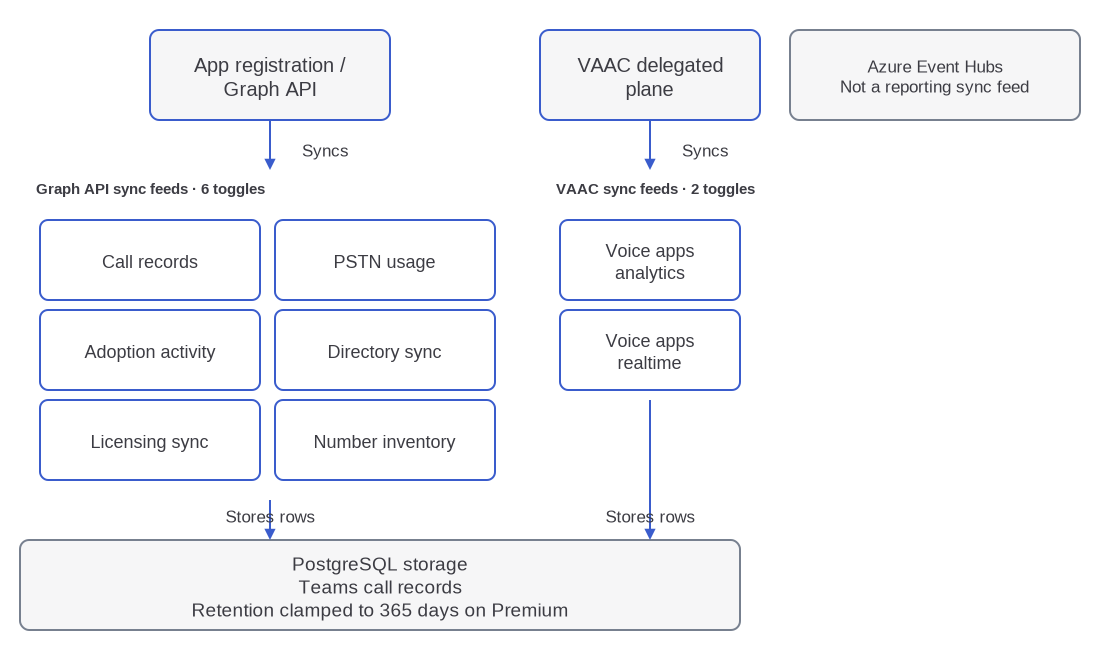
In Call Telemetry, navigate to Settings → Microsoft Teams → Reporting & Sync. Each data feed is managed by an independent toggle to allow granular control over data collection and API quota consumption:
Sync Feed Toggles
call_records_enabled: Synchronizes peer-to-peer and PSTN call records via Microsoft Graph/communications/callRecords. Call quality metrics (audio, video, and screen-sharing stream jitter, packet loss, round-trip delay, and synthetic/native MOS) are extracted directly from call record payloads during ingestion; there is no separate call quality sync toggle on 0.8.6.pstn_usage_enabled: Polls Direct Routing and Calling Plan records via/communications/callRecords/getDirectRoutingCallsand/communications/callRecords/getPstnCalls.adoption_activity_enabled: Ingests M365 daily user activity summaries and Teams client utilization via/reports/getTeamsUserActivityUserDetailand/reports/getOffice365ActiveUserDetail.voice_apps_analytics_enabled: Polls VAAC historical daily summaries for Auto Attendants and Call Queues.voice_apps_realtime_enabled: Enables near-real-time queue depth and active agent tracking. Polling is evaluated by a 1-minute cron worker with a configurable per-organization polling interval (voice_apps_realtime_interval_minutes, default: 5 minutes, minimum: 1 minute).directory_sync_enabled: Imports user directory attributes (departments, managers, job titles, office locations) for report grouping.licensing_sync_enabled: Synchronizes assigned M365 SKUs and Teams Phone licenses via/subscribedSkus.number_inventory_enabled: Synchronizes Microsoft Teams telephone number allocations and assignment status.
License Tiers & Enforcement Gate
Call Telemetry 0.8.6 enforces strict license gating on the report execution endpoint (POST /reports/query).
- Advanced Tier Requirement: 36 report templates across Teams and Cisco integrations—including
ms_teams_call_detail,ms_teams_pstn_usage,ms_teams_call_queue_historical_summary, and all chargeback templates—require an Advanced or Premium license tier. - License Gate Behavior: If an appliance running the Community or Essentials tier attempts to execute a gated report query, the API returns:
(HTTP 403 Forbidden){"error": "license_restricted","message": "This report template requires an Advanced or Premium license.","required_tier": "Advanced"}
- Emergency Rollback Mode: For migration troubleshooting during an upgrade, administrators can set the configuration option:
The default is# config/runtime.exsconfig :cdrcisco, :report_license_enforcement, :log_only
:enforce. When set to:log_only, queries log a warning but permit execution.
Data Retention Limits
In Call Telemetry 0.8.6, ms_teams_call_records is deliberately unpartitioned (ADR 1060). Data retention for Microsoft Teams reporting is strictly enforced:
- Clamped to the License Maximum (365 Days on Premium): Call Telemetry 0.8.6 clamps effective reporting retention to the organization's license maximum (365 days on the Premium tier, with a conservative default of 30 days for licensed tiers).
- Automatic Purge Maintenance: The scheduled daily purge worker scans the unpartitioned
ms_teams_call_recordstable and prunes any records exceeding the organization's retention ceiling.
Teams Call Network Detail Retention Group
Call network detail is stored in five tables (call summaries, sessions, media-stream sides, participants, and correlations). A retention group lets an organization set one retention value for all five instead of five separate values. Group retention is off by default: nothing is removed by a group until an administrator adopts the group for the organization and group enforcement is switched on for the appliance. The group value can't be set below 31 days, because Teams reconciliation re-reads the last 720 hours of call records and a shorter value would re-import and re-delete the same calls.
Limits
Disk space comes back gradually, not immediately. Group retention deletes rows. It does not compact tables, and the database size on disk can stay flat for days after a large first run.
- Call Telemetry 0.8.6: there is no partition maintenance. Space freed by deleted rows is reclaimed gradually by PostgreSQL autovacuum and the nightly routine vacuum.
- Call Telemetry 0.8.7: monthly partitions that are completely empty and older than the longest retention configured for that table by any organization are dropped, which returns their space at once. Partitions that still hold rows, including the current month and the month containing the cutoff, have their expired rows deleted and are reclaimed gradually by vacuum.
The call identity index is kept. One small identity row per call (ms_teams_call_record_index) stays after the call's detail is deleted. It is what stops reconciliation from re-importing a call you purged, so it must outlive the detail rows. Measured on PostgreSQL 16, it uses roughly 0.3 to 0.5 GB per million calls, which is small next to the detail tables, and it is not pruned.
Group retention deletes every call older than the cutoff for the organization. It has no legal-hold or "retain until" exemption, unlike SIP evidence. If you must preserve specific Teams calls, export them before adopting a group value, or keep group retention switched off. Contact support if you need hold support for Teams call detail.