Cisco Extension Mobility (EM) Usage Report
Track Extension Mobility logins across your CUCM clusters. See who's currently logged in and the last login details for each device—all from a single dashboard with multi-cluster support.
What is Extension Mobility
Cisco Extension Mobility (EM)—also known as hot desking or hoteling—lets users sign in on a shared phone or softphone and have their lines, services, and speed-dials follow them. When they log out, the device reverts to its base state.
Call Telemetry makes it easy to see current and last login status across all your clusters from one interface.
What the report shows
| Column | What it answers | Example |
|---|---|---|
| Call Manager | Which CUCM cluster? | Demo CallManager |
| User ID | Who signed in? | demo |
| Profile | Which EM device profile was applied? | JASONEM |
| Device Name | Where did they sign in? (device/softphone) | SEP00C2911308A |
| Status | Are they still logged in? | Logged In / Logged Out |
| Login Time | When did the session start? | Dec 31, 06:37 AM |
| Duration | How long has the session run? | 489h 21m 10s (live counter) |
| Logout Time | When did it end? | Blank if still active |
| Phone Model | What hardware/software? | Cisco IP Communicator |
| Device Pool | Which site/region/policy? | Default |
| Description | Human context / asset tag | Auto 1002 |
| Extensions | Lines assigned to the profile | 1002 (E911) |
Key Capabilities
- Current & last login — see who's logged in now and the last user per device
- Multi-cluster support — query all CUCM clusters from one interface
- CSV export — download results for reporting
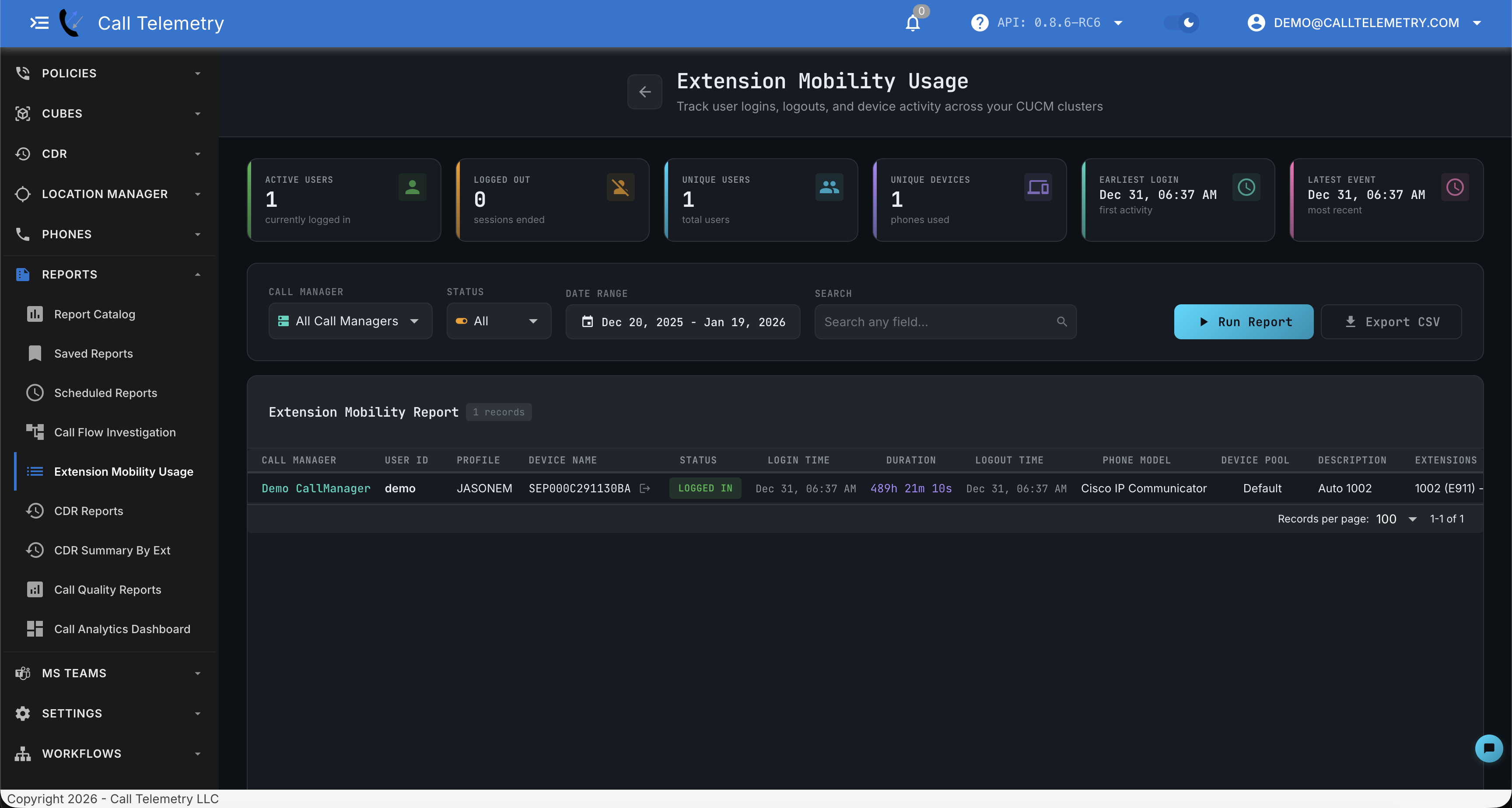
Summary Cards
The dashboard header displays real-time statistics:
| Card | Description |
|---|---|
| Active Users | Users currently logged in |
| Logged Out | Sessions that have ended |
| Unique Users | Total distinct users in the period |
| Unique Devices | Total phones used for EM logins |
| Earliest Login | First activity timestamp |
| Latest Event | Most recent login or logout |
Using the report
- Navigate to Reports → Extension Mobility Usage in the sidebar
- Select Cluster: Choose a specific Call Manager or All Call Managers
- Filter by Status: Select All, Logged In, or Logged Out
- Set Date Range: Pick a custom date range for historical data
- Search: Type in the search box to filter by any field
- Run Report: Click to execute the query
- Export CSV: Download results for external analysis
Search Any Field
Type anything in the search box to filter results across all columns simultaneously. Search by user name, device name, phone model, device pool, or any other field.
Common searches:
- Find a user:
demoorjason - Find a device:
SEP00C2911308A - Find softphones:
CommunicatororJabber - Find by site: Search by device pool name
Filtering Options
- Call Manager: Query a specific cluster or all clusters
- Status: Filter to show only Logged In, Logged Out, or All
- Date Range: Set start and end dates for historical analysis
Export to CSV
Click Export CSV to download all data with proper headers for Excel or reporting tools.
Additional Features
- Multi-cluster support - Works across all your CUCM clusters. Choose all clusters or pick the cluster in the dropdown and query.
- Force logout capability - Click the Logout button next to any Logged in Device to remotely log the user out.
- Real-time data - Usage Information is live queried from Cisco CallManager via AXL when you click Run Query.