Release 0.8.6
January 21, 2026
Overview
This version took longer than expected and turned out amazing. Lots of new features, improvements, and fixes across the board.
- Policy Engine performance boost with 700 calls/second sustained
- Policy Analytics dashboards for all license levels
- Rebuilt CDR reporting system with 50+ templated reports
- UC Analytics Dashboard & Wallboard with shared wallboard links
- User Activity and Audit Logs across all pages
- CUBE Analytics real-time dashboard with peer health monitoring
- Phone Dashboard with multi-select remote control
- CTI User Audit Wizard for automated setup validation
- Missed Call Alerts with Cisco Mobility support
Microsoft Teams
- Teams real-time events, including emergency notifications, are delivered through Azure Event Hubs. HTTP webhook delivery for Microsoft Graph change notifications is no longer used. Configure Event Hubs in Settings → Microsoft Teams → Event Hubs before upgrading; the installer checks this setting. See the Azure Integration Guide.
- On appliances with more than one organization, unassigned Teams workflows and related settings are assigned to the first organization. Teams workflow API requests are limited to the caller's organization.
- Teams reporting retention follows the license maximum: 365 days on Premium, and 30 days on other licensed tiers.
- If an appliance ran with debug logging enabled before 0.8.6, rotate Microsoft Entra ID app client secrets, refresh Teams OAuth tokens in Settings → Microsoft Teams, reset local administrator passwords, and replace pre-0.8.6 diagnostic bundles. This does not apply to appliances that did not run with debug logging.
Reporting
- Report execution (
POST /reports/query) requires an Advanced or Premium license for 36 Teams and Cisco templates, including call detail, PSTN usage, call queue summary, and chargeback reports. Community and Essentials receive HTTP 403 (license_restricted). During a migration window, enforcement can temporarily be set to warning-only in appliance configuration (config :cdrcisco, :report_license_enforcement, :log_only). See Teams Reporting & Analytics.
Policy Engine Updates
- Policy History Rebuild - Much more data is recorded including reputation signals and history, events, debugs.
- Policy Performance Boost - Heavily optimized, new sizing and performance published, including a 700 call per second sustained example shown in sizing guides.
- Random Greeting Manager - New support for selecting multiple greeting messages with randomized playback of a greeting for callers.
- Configurable block greeting toggle - Org-level control for whether block greetings play on policy blocks.
- Calling Device Filters - Introduced new rule level filtering capabilities based on the calling device attributes. Useful for filtering rules for devices, like VG., SEP., or excluding specific devices from a rule.
- General - Improved error handling in Webhook App, added retry logic for transient errors.
- App Template Rendering - Template variables now support arrays and objects for advanced JSON payloads.
- CURRI Soft Redirect Upgrade Note - Some 0.8.6 builds render an existing Permit rule with
new_called_numberascontinue.simpleplusmodify callednumberinstead ofdivert.simple. Verify the installed build in Policies → Call Test and confirm the expected numeric destination before relying on a directory-number divert. If the response does not contain a divert, keep the redirect behavior disabled until you install a corrected build. See Soft Redirect for Blocked Calls. - CURRI Called-Number Divert Change - On corrected builds, an existing Permit rule with
new_called_numbernow returnsPermitwith a CURRIdivert.simpleto that number instead of the earliercontinue.simpleplusmodify callednumberresponse. Review rules that rely on the previous response and verify the destination routes through the External Call Control Profile's Diversion Rerouting CSS. See Soft Redirect for Blocked Calls. - Block Treatment Map Upgrade Note - In 0.8.6 patch 1, TDoS Protection, Watch List — Threshold Violations, and Device Call Quota now reject even when Treat Blocked calls as Redirects is enabled; patch 1 has no per-source map controls. On map-enabled builds, those rows default to
Rejectand can be changed explicitly. If you relied on the previous global redirect behavior for these throttle sources, review the new defaults before upgrading and verify each row in Call Block Settings when the map is available. See Block Treatment Map. - Bulk Rule Management - New feature allowing for the deletion of multiple rules at once while managing a policy.
- Fix - Rule ordering and insertion bug - Resolved an issue where rules were not being inserted in the correct order, causing a failure to insert the rule.
- Rebuild Rule edit page - Helps users manage complex rule pattern + tag matching.
- Export/Import Rules - New feature allowing users to export and import rules in CSV from the policies edit page.
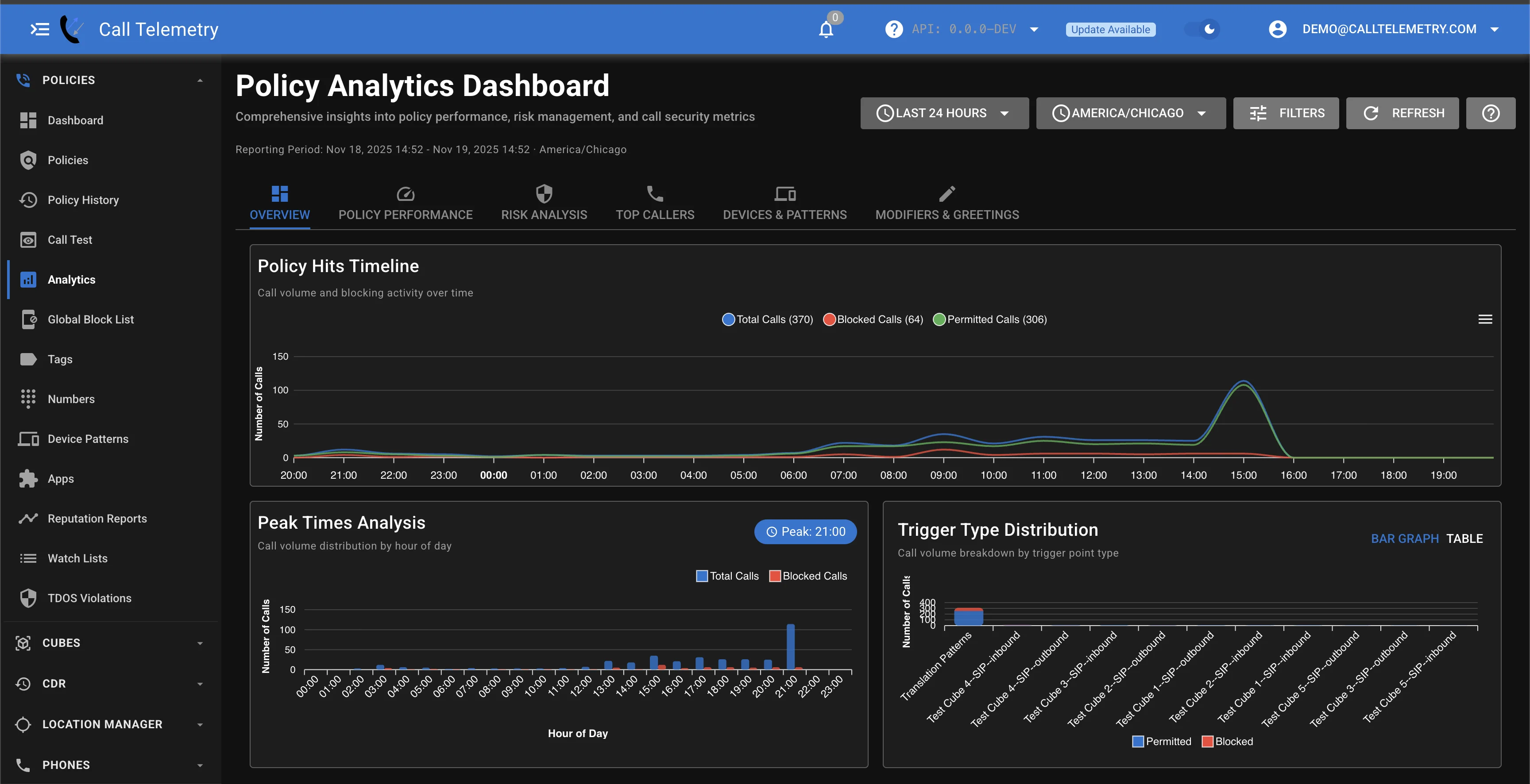
Policy Analytics (All levels)
New dashboards show policy level performance metrics - timelines, peak times, reputation data, reports about greetings used, actions taken, top call information and more. This is generated from the CURRI API and Cube API, and is available to all license levels.
Cube Analytics and Realtime Dashboard (Advanced)
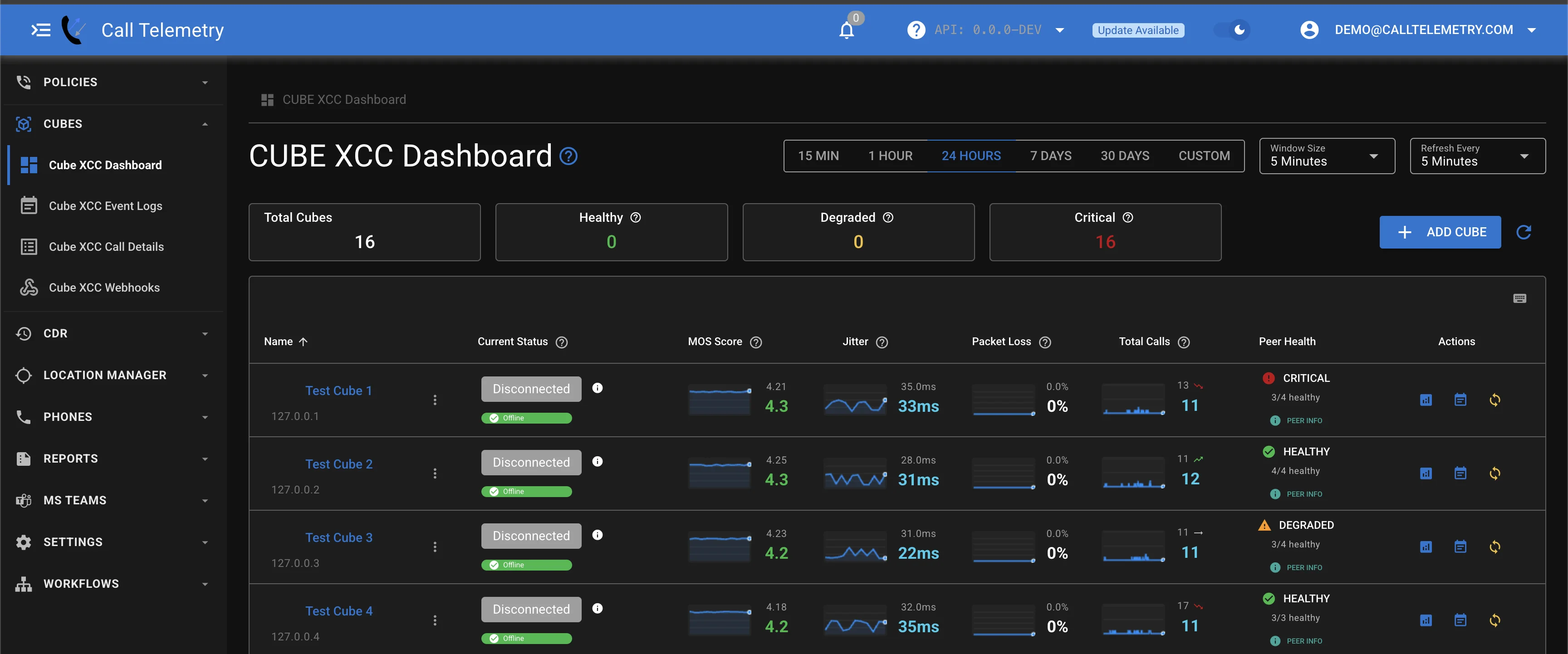
Cube Analytics was greatly enhanced (maybe even rebuilt), and is now a realtime dashboard, providing drilldown of metrics and calls details per Cube, and per Peer health. Health is monitored through KPIs like MOS Score, Jitter, and Packet loss with better statistical analysis to ensure accurate and relevant insights. Instead of hard fixed thresholds, the system adapts to changing network conditions, raising alarms over significant deviations from normal baseline.
- Peer Health: New KPI dashboard providing real-time visibility into voice gateway health. Includes a Peer table showing each peer's status, key metrics, and recent activity.
- Voice Quality Analytics: Realtime MOS scoring, jitter analysis, and packet loss monitoring - per Cube, and per Dial Peer
- Disconnect Code Analysis: Enhanced call failure categorization and abnormal call filtering
- Many fixes: Fixed many edge cases from user reports shared back from live deployments.
- XCC Application URL: The URL is fixed and shows up correctly in the Edit page now.
- XCC Payload Mirroring: Moved Clone Payload settings to XCC Mirror Logs tab for better logical grouping
- XCC Disconnect Code Enhancement - Corrected missing disconnect codes
Missed Call Alerts (Advanced)
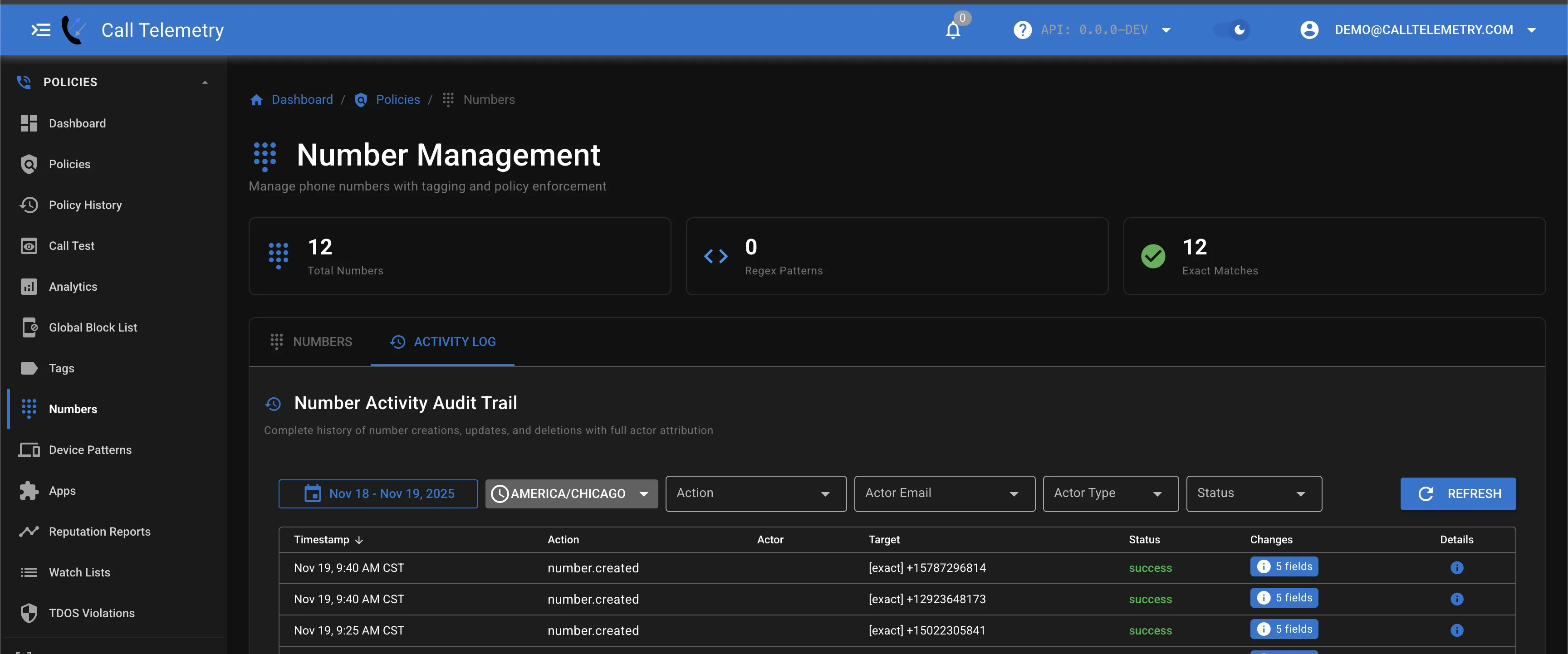
- Missed Call Page Revamp: Updated UI and UX for better user interaction.
- Expanded URL Scheme Support: Missed call URLs now support user-customizable schemes (tel://, jabber://, slack://, etc).
- Improved Button Logic: Added and fixed logic to hide callback and message buttons.
- Cross-Platform Styling: Consistent button styling across Mac Outlook, Windows Outlook, and OWA.
- Mobility Enhancements: Added support for Cisco Mobility scenarios, including Single Number Reach, Mobile Connect, and other scenarios for missed calls.
User Activity and Audit Logs
- User Activity Logs: Comprehensive audit trail system capturing all user actions, configuration changes, and system events. Provides role-based access control and performance-optimized queries for compliance reporting.
All pages will now include user activity logs, showing who made what changes and when. This is a huge step forward for compliance and auditing.
CDR Reporting and Analytics
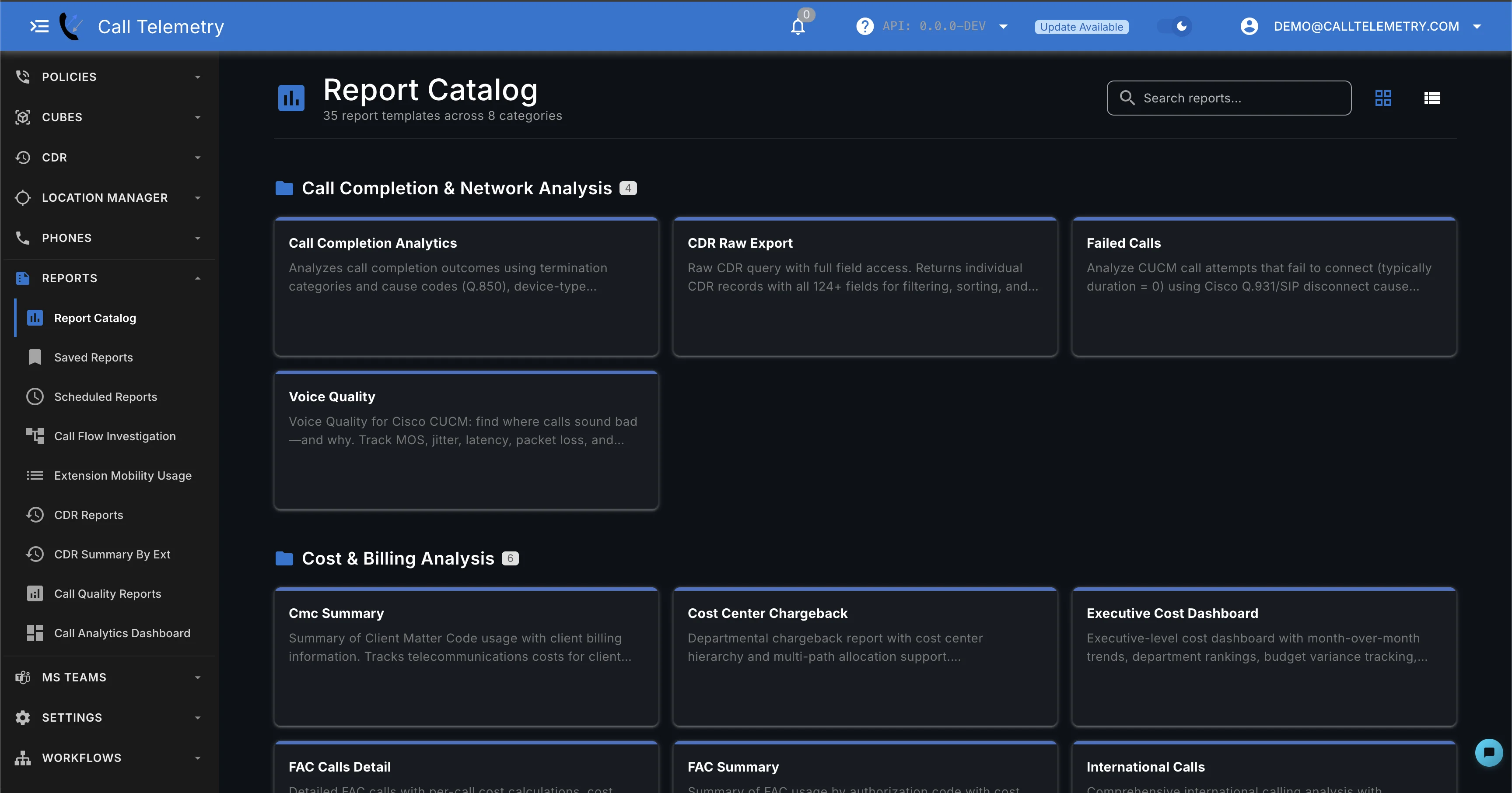
The CDR reporting system was completely rebuilt from the ground up. The previous system worked but lacked flexibility - you couldn't easily customize reports or schedule automated delivery. The new system changes everything.
Key Improvements:
- 50+ Templated Reports - Pre-built reports covering call patterns, quality metrics, cost analysis, capacity planning, and compliance needs. Each template is production-ready with sensible defaults.
- Report Builder - Create custom reports by selecting fields, filters, groupings, and chart types. No SQL required.
- Saved & Scheduled Reports - Save report configurations for one-click access. Schedule automatic delivery via email - daily, weekly, or monthly.
- Chart Visualizations - Every report includes relevant charts (bar, line, pie, heatmap) that update dynamically with your filters.
- PDF & CSV Export - Export any report with a single click for sharing or archival.
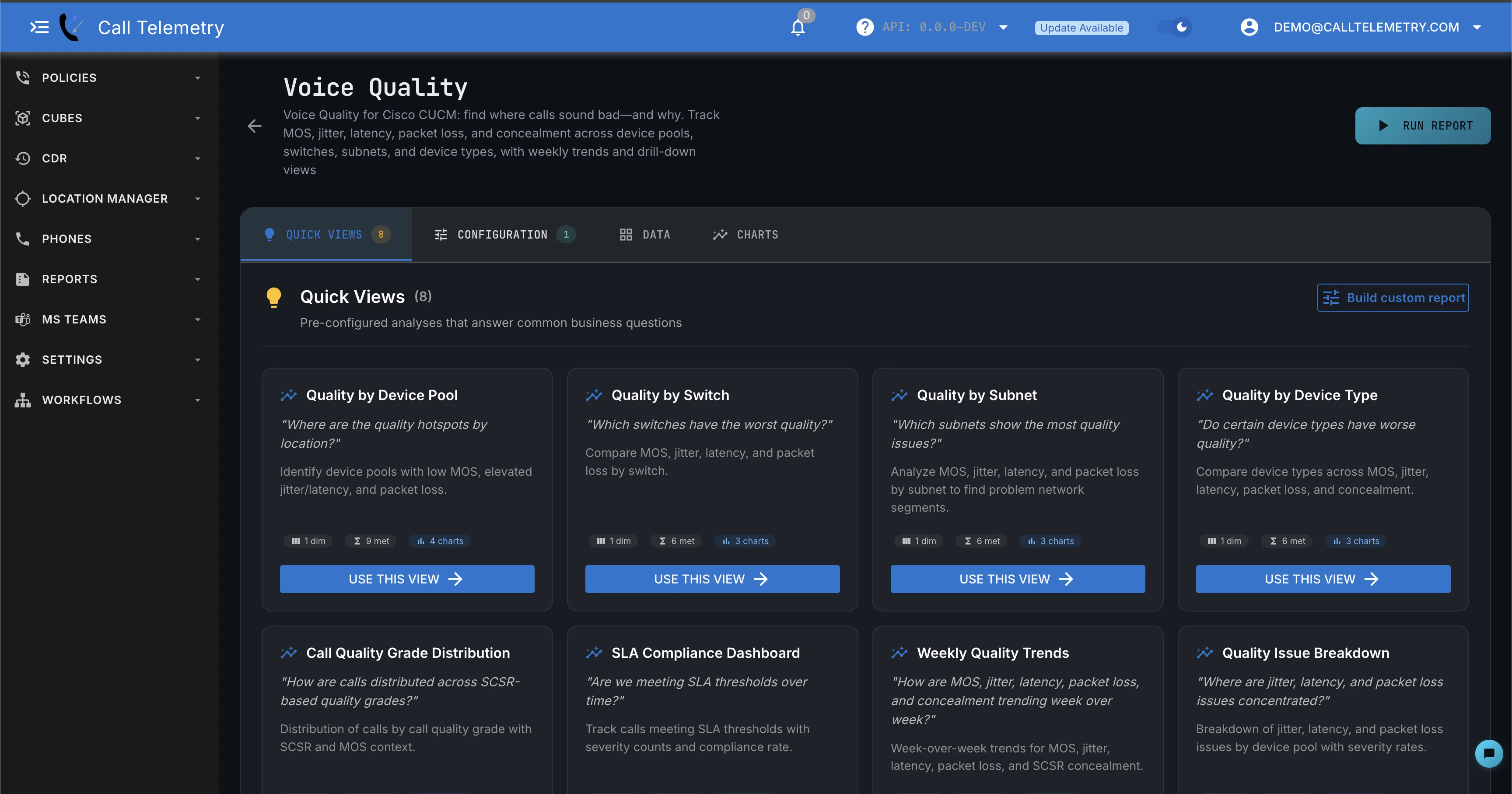
Template Quick Views
Quickly preview and select from our comprehensive library of pre-built report templates.
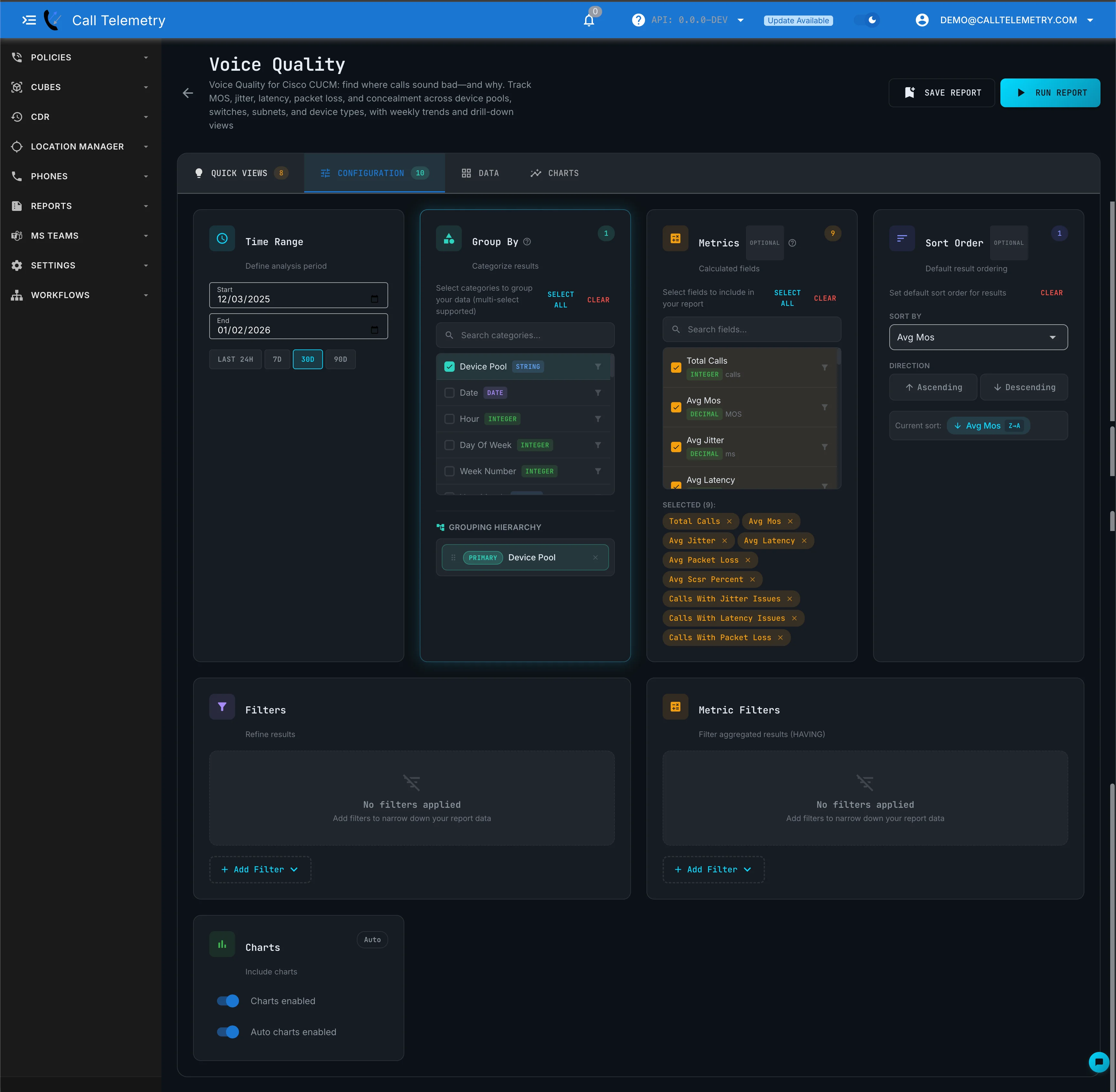
Report Builder Configuration
Configure reports with our intuitive builder interface - select metrics, filters, and groupings.
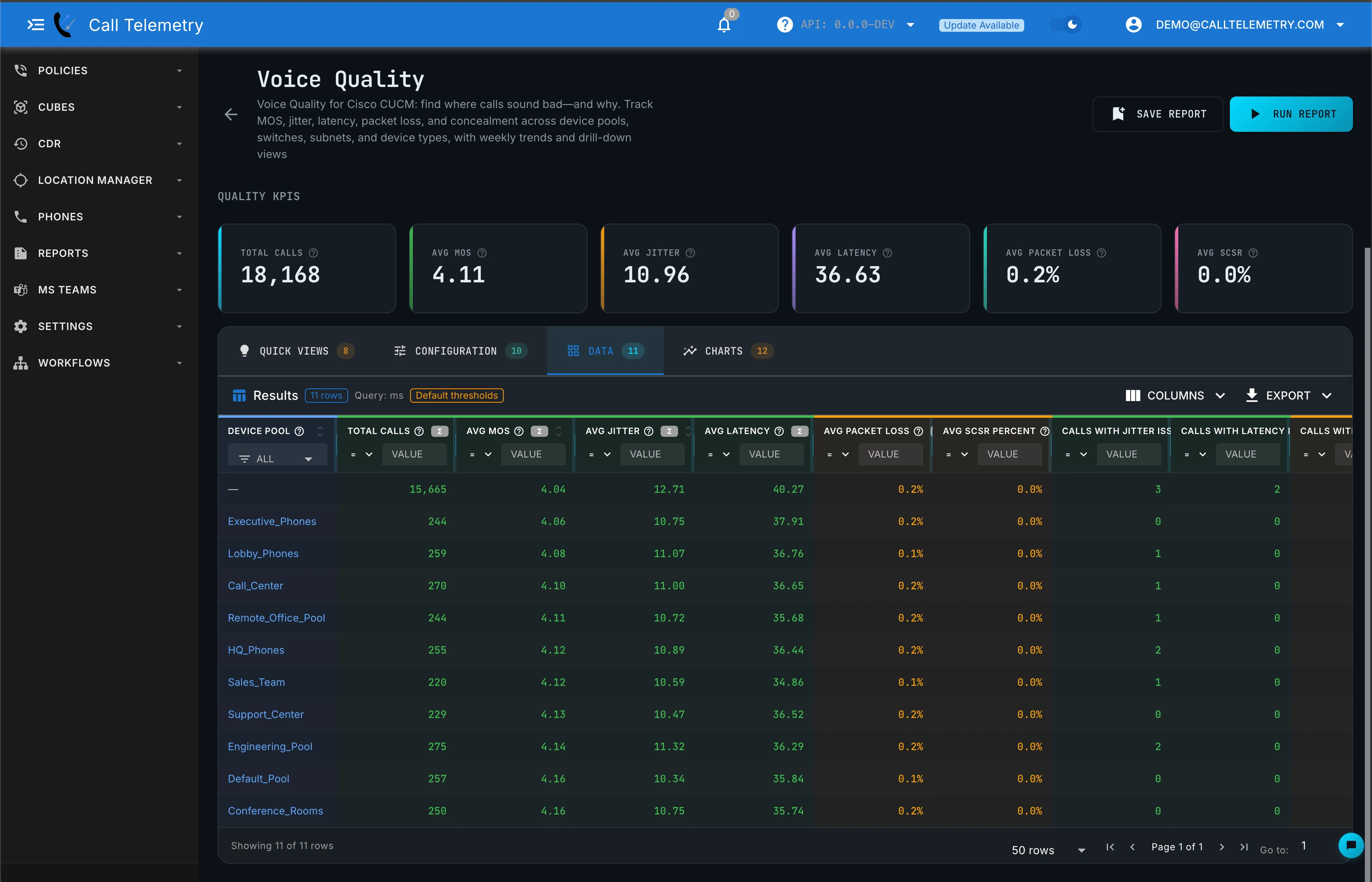
Report Results
View detailed tabular results with export options.
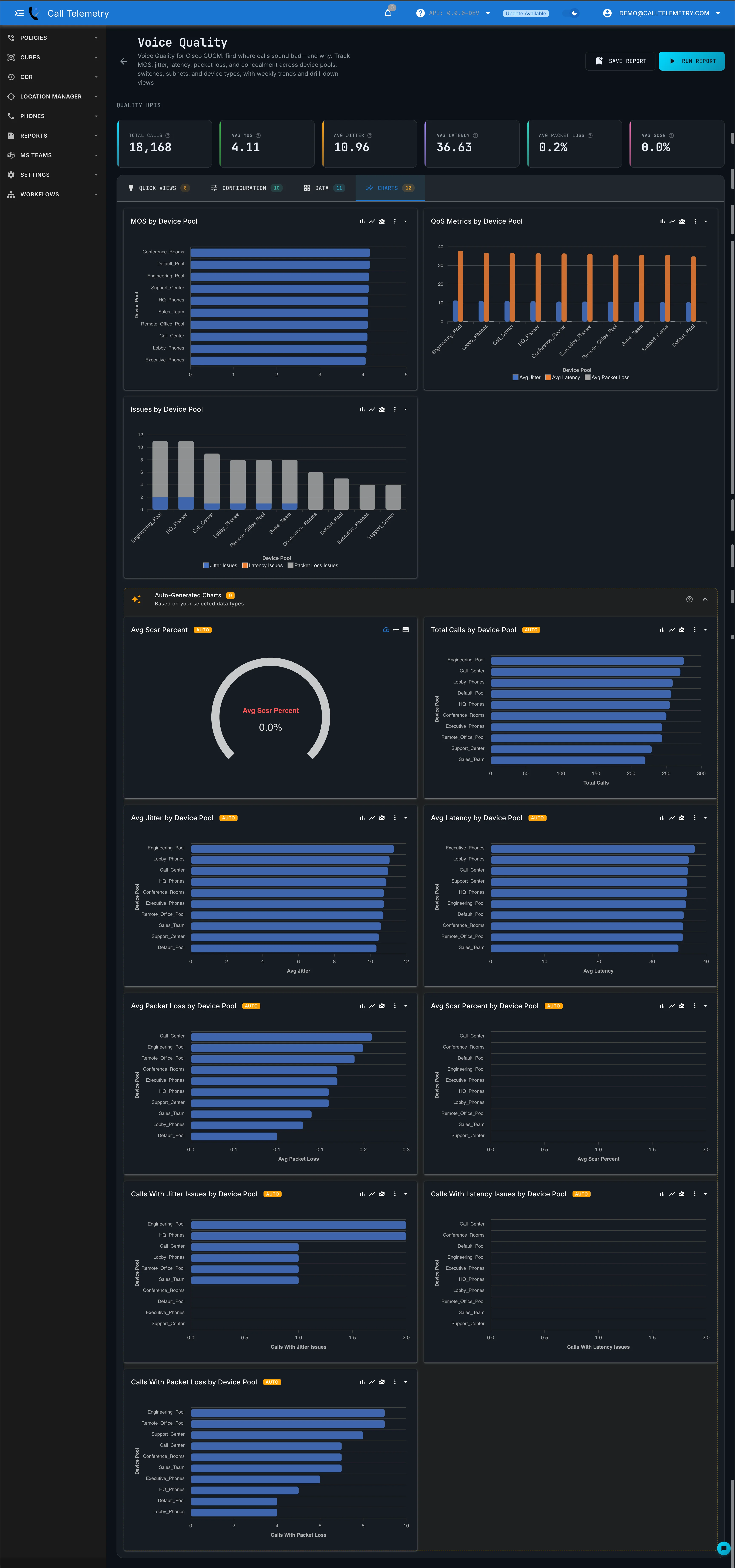
Report Charts
Visualize your data with interactive charts and graphs.
New Report Library:
-
Abandoned Calls: Analyzes unanswered/abandoned call patterns to find service gaps.
-
Call Direction by Number: Inbound vs outbound analysis per phone number with costs.
-
Call Forwarding Report: Call forwarding analytics incl. work location, destination classification, and cost tracking.
-
Call Quality Analytics: Call quality metrics with termination code analysis.
-
Call Quality Scorecard: MOS scorecard by device/gateway; correlates CDR + CMR.
-
Call Queue Summary: Queue performance (waits, abandonment, capacity peaks).
-
Capacity Utilization Planning: Historical trunk/gateway traffic with Erlang load per 15‑min interval.
-
CDR Raw Export: Full-field CDR export (124+ fields) replacing legacy history API.
-
Client Matter Code Summary: CMC usage summary with billing info.
-
Conference Call Analysis: Conference call analytics with department cost tracking and peak concurrent analysis.
-
Cost Center Chargeback: Departmental chargeback with cost center hierarchy/allocation.
-
CUBE Media Capacity: Concurrent call capacity/utilization on CUBE gateways & SIP trunks; detects port exhaustion.
-
CUBE Peer Usage: Call volume/quality/success by CUBE dial-peer.
-
CUBE Troubled Calls: Flags CUBE calls with MOS/jitter/packet loss issues.
-
Department Summary: Department telecom usage and cost analysis.
-
Device Call Patterns: Device-level inbound/outbound patterns, peak usage, performance.
-
Device Firmware Tracking: Device inventory + activity; finds dormant/phantom licenses with firmware details.
-
Dormant Devices: Dormancy analysis combining RIS registration and call activity.
-
Dormant Users: Finds users with no recent call activity for license reclamation.
-
Emergency Call Tracking: Tracks emergency calls across global number standards; defaults for major countries.
-
Executive Cost Dashboard: Exec-level cost dashboard with MoM trends and budget variance.
-
FAC Calls Detail: Detailed FAC calls with per-call cost calculations.
-
FAC Summary: FAC usage summary by authorization code with costs.
-
Failed Calls: Comprehensive failed-call analysis using Cisco cause codes.
-
Hunt Group Agent Performance: Agent performance inside hunt groups (answers, rejects, AHT, answer rate).
-
Hunt Group Summary: Hunt group performance—distribution, answer rates, member activity.
-
Phone Registration Health (Essentials): Classifies every phone into five actionable health categories (Healthy, Connectivity Issue, Failed Over, Rejected, Configuration Issue) instead of raw Cisco
status_reasoncodes. Drill down by device pool, location, model, and cluster; includes recently offline, stale registered, and never-seen detection with Quick Views. -
International Calls: International call patterns with real costs via costing rules.
-
Manager Team Performance: Team performance by department with EndUser integration.
-
Missed Call Analysis: Voicemail/missed-call trends with rankings and moving averages.
-
MOS Score Analysis: MOS quality analysis correlating CDR + CMR to find degradation patterns.
-
Network Performance Analysis: Network jitter/packet-loss trend analysis for optimization.
-
Network Quality by Location: Quality by location/device/time to spot hotspots.
-
Peak Hour Analysis: Identifies peak call volume periods using window functions.
-
Policy Blocking Summary: Historical blocked calls (TDOS, watch list, rules, apps) with trends/top callers.
-
Quality Threshold Alerts: Counts calls below quality thresholds (MOS/jitter/loss) grouped by device/time/issue.
-
Quality Tier Analysis: Quality tier distribution using ITU P.800 MOS thresholds and latency buckets.
-
Toll Fraud Detection: Multi-factor toll-fraud risk scoring (international/premium, after-hours, scanner patterns).
-
Top Abandoned Hunt Groups: Top 10 hunt groups by abandoned calls.
-
Top Abnormal Cause Codes: Most common abnormal termination causes.
-
Top Cost Users: Top 10 users/extensions by call cost.
-
Top Failed Extensions: Top 10 extensions with the most failed calls.
-
Top International Destinations: Top 10 international destination prefixes by volume and cost.
-
Top Phones with Quality Issues: Phones with quality issues (CMR concealment, MOS, jitter, latency).
-
Top Talkers and Receivers: Top talkers/receivers with rankings, trends, and cost tracking.
-
Trunk Capacity Analysis: Historical trunk utilization with Erlang load by gateway/hour/day.
-
User Call History: Individual user call history with full audit trail and analytics.
-
User Device Adoption: User device preference (softphone vs hardphone) with last activity for migration/licensing.
-
Retired Short Duration Callers - Replaced with new CDR Top Inbound Callers report, providing the same data and more.
-
New CDR Suspect Callers Report - Formerly Top Inbound Callers report - Provides insights into the most active inbound callers, helping to identify key contacts and potential issues. These new reports include analytics that relate back to your system's CDR history, TDOS, Watch List, Blocks, including duration, counts, call behavior such as time of day, burst rate, and more. From this page you can cross link to full CDR history, Block, or add the number to your master numbers database and add tags such as whitelisting.
UC Analytics Dashboard & Wallboard (Advanced/Premium)
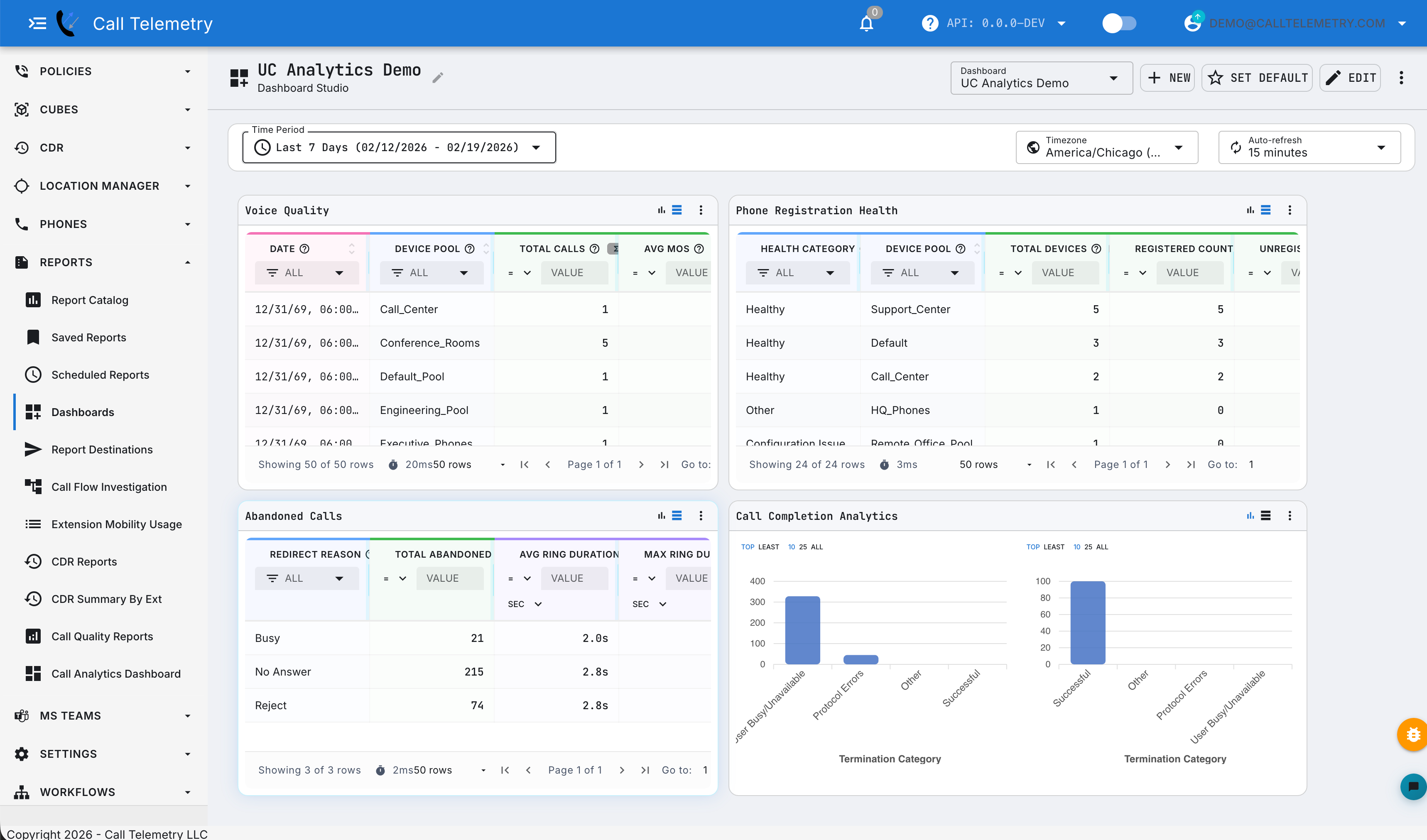
New custom dashboard builder lets you pin any of the 36 report templates as a widget — charts, KPI cards, and tables on a drag-and-drop grid with real-time refresh. Build a live wallboard from your on-premise Cisco CDR, CMR, and CUBE data without writing queries.
- Widget-Based Layout — Pin report templates, saved reports, or charts as widgets on a responsive 12-column grid
- Real-Time Refresh — Auto-update at intervals from 30 seconds to 30 minutes, configurable per-widget or dashboard-wide
- 10 Chart Types — Bar, horizontal bar, line, area, pie, donut, gauge, heatmap, radar, and KPI cards
- Saved Report Linking — Link a widget to a saved report so config changes flow through automatically
- Global Filters & Timezone — Apply date ranges and filters across all widgets with timezone-aware aggregation
- Drill-Down to Report Builder — Expand any widget and jump to the full Report Builder with the widget's query pre-loaded
- PDF Export — Export the entire dashboard as a single PDF
- Shared Wallboard Links (Premium) — Generate a token-controlled, least-privilege link for read-only dashboard access — no login required. Revoke or regenerate at any time.
- Wallboard Mode — Full-screen display for team monitors, lobby screens, and operations centers
CDR and CMR Call Quality Metrics
Completely rebuilt call quality analytics with modern endpoint concealment and severe concealment support, plus synthetic MOS scoring for calls that don't report MOS directly (based on ITU calculations).
New Dashboard Features:
- Quality Score & MOS Trending - High-level metrics with historical trends
- Problem Indicators - Network issues visualized by hour (packet loss, jitter, latency)
- Call Metrics Tab - Volume and duration analytics with multiple chart views
- Endpoint Metrics Tab - Device-level analysis with worst performers list
- Impacted Devices Tab - Actionable alerts with recommended fixes
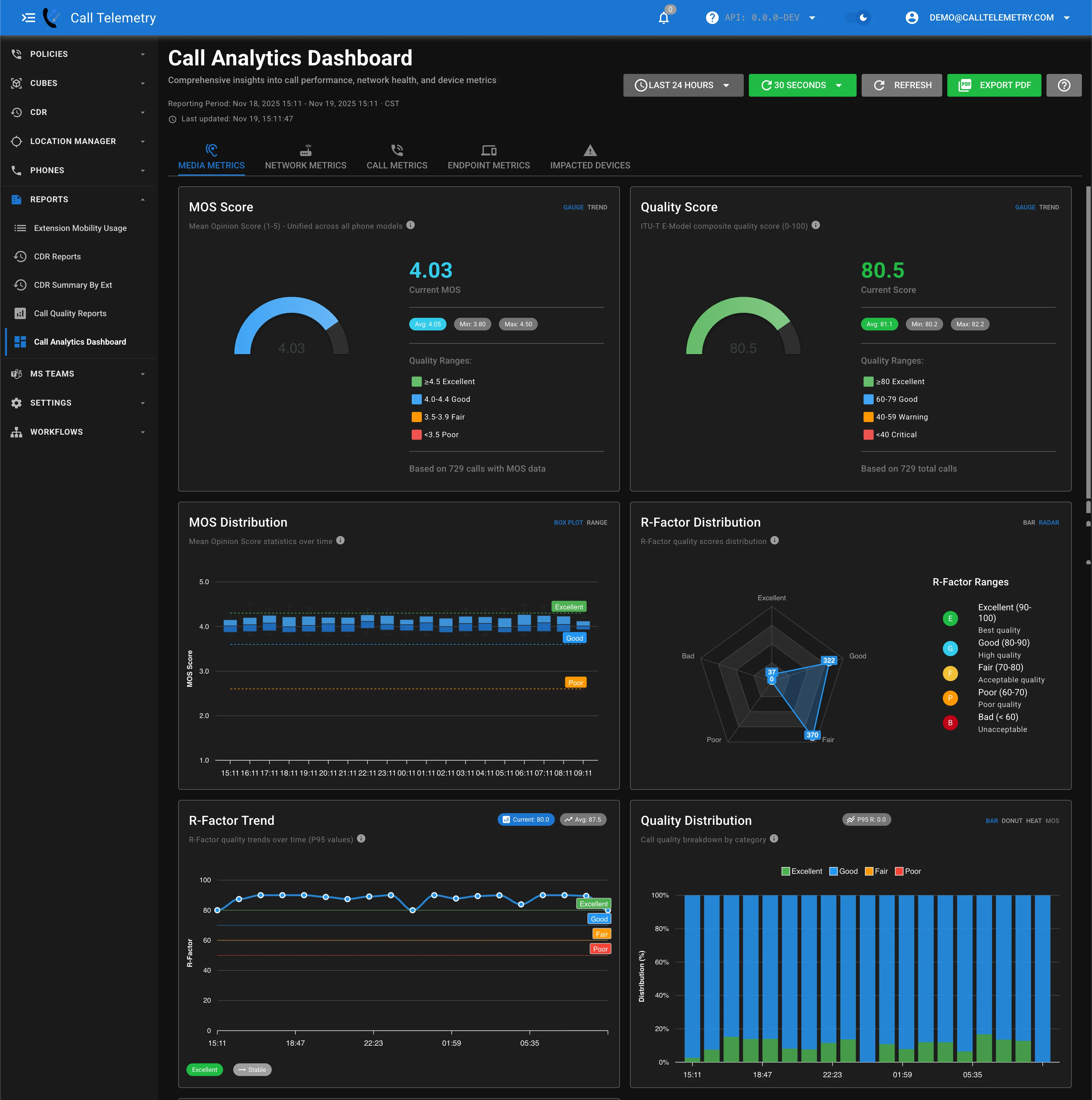 Main dashboard with MOS trending and quality overview
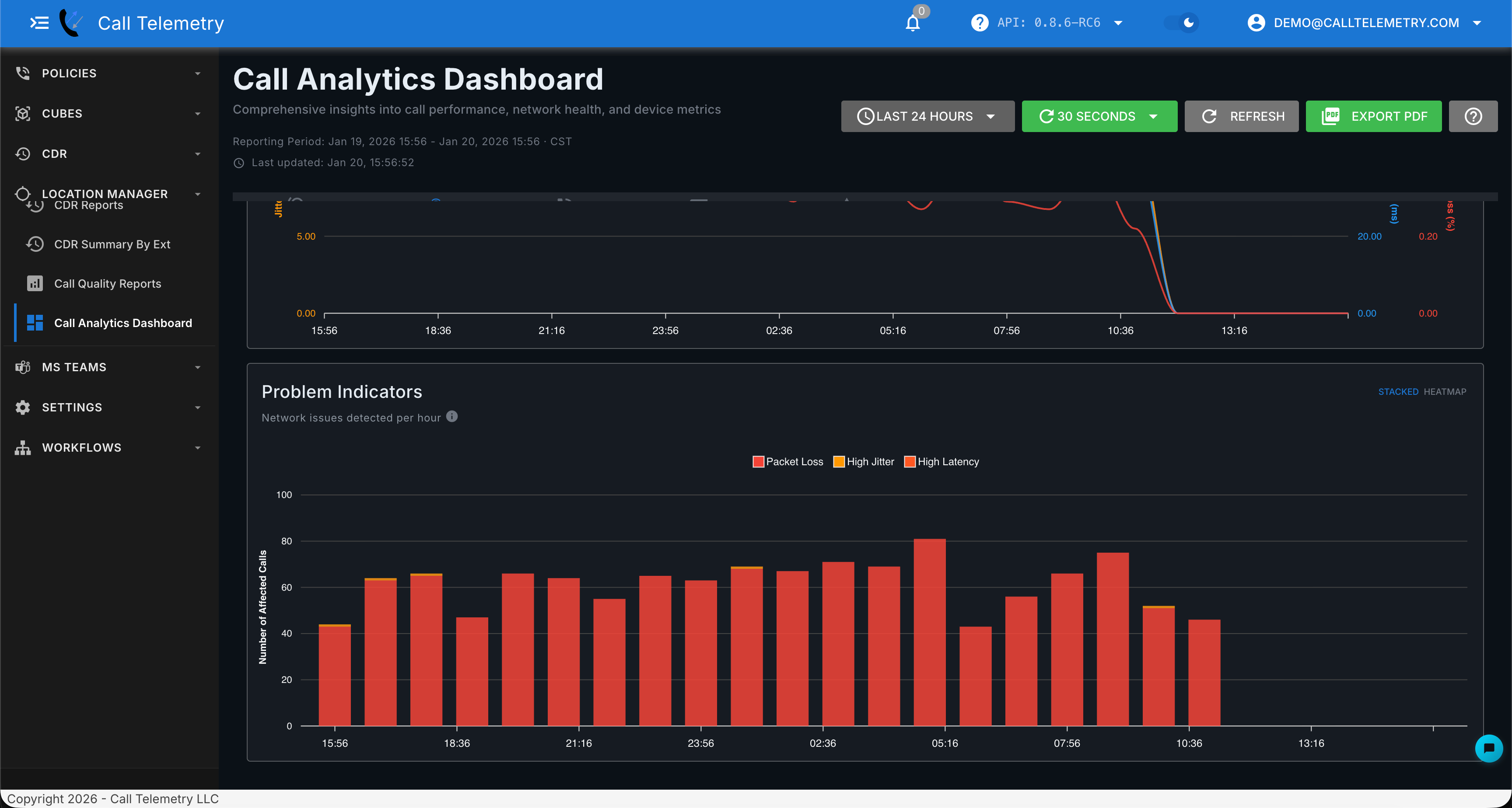 Problem indicators showing packet loss, jitter, and latency issues by hour
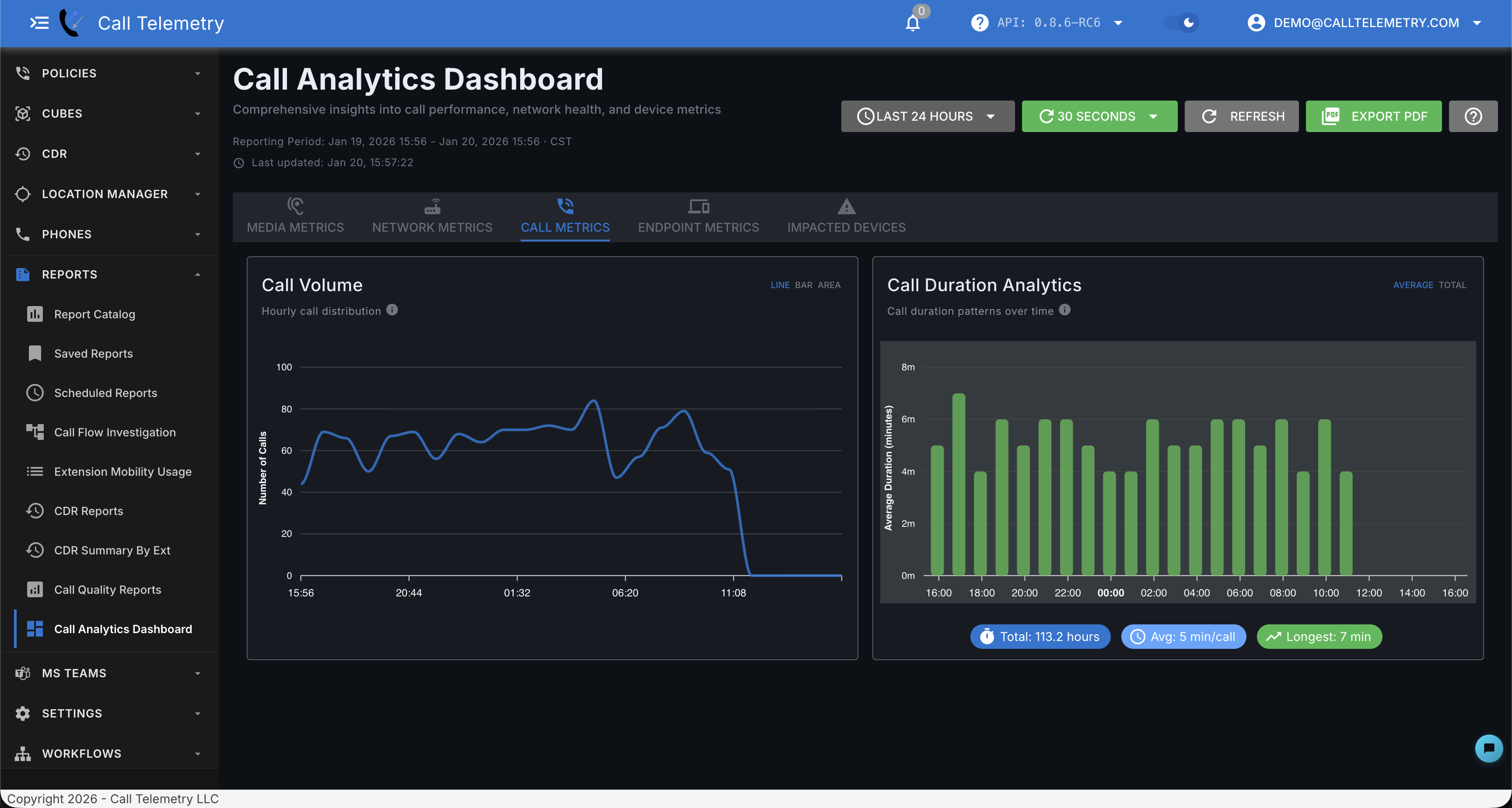 Call volume and duration analytics
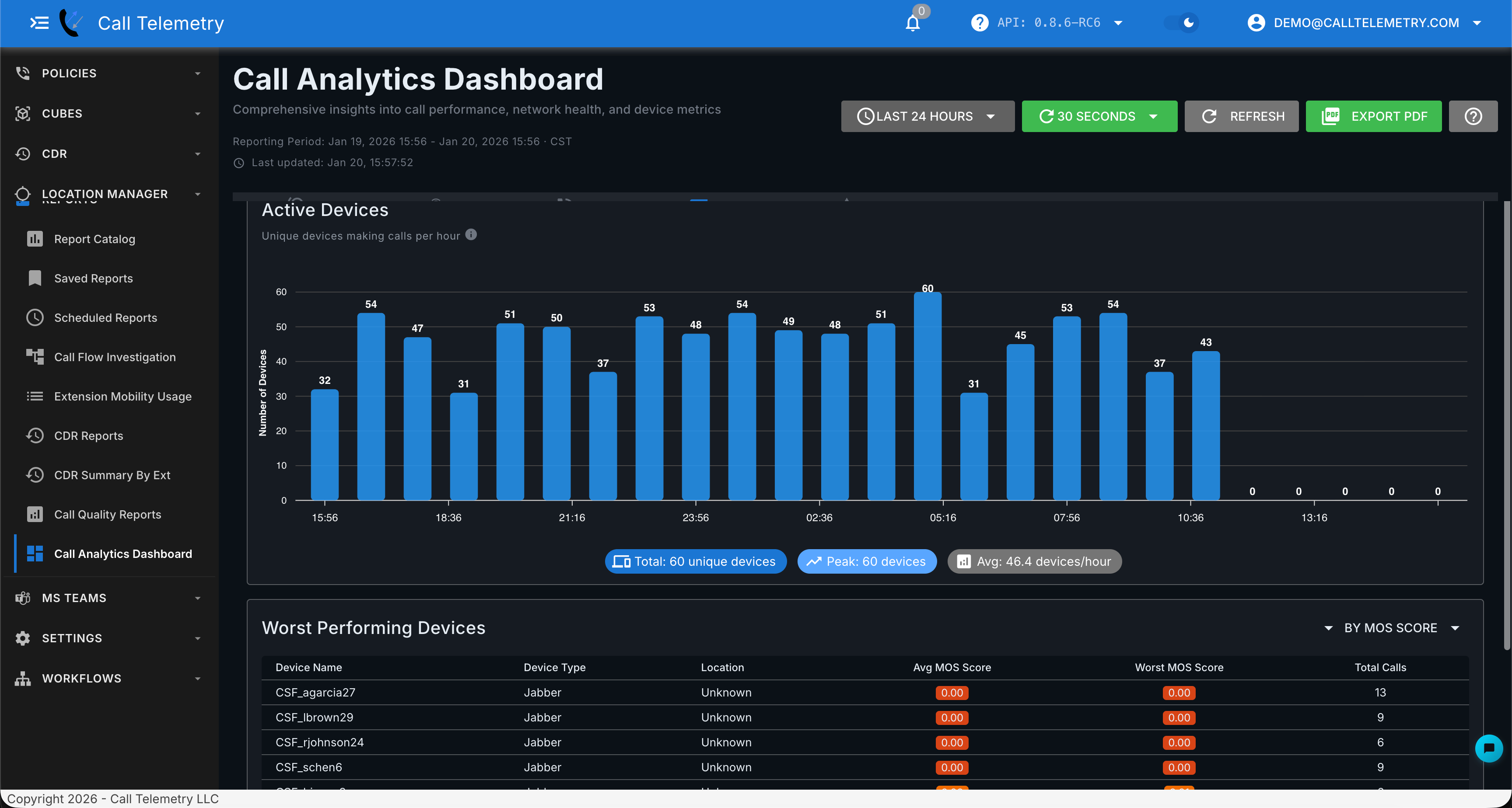 Device-level analysis with worst performing endpoints
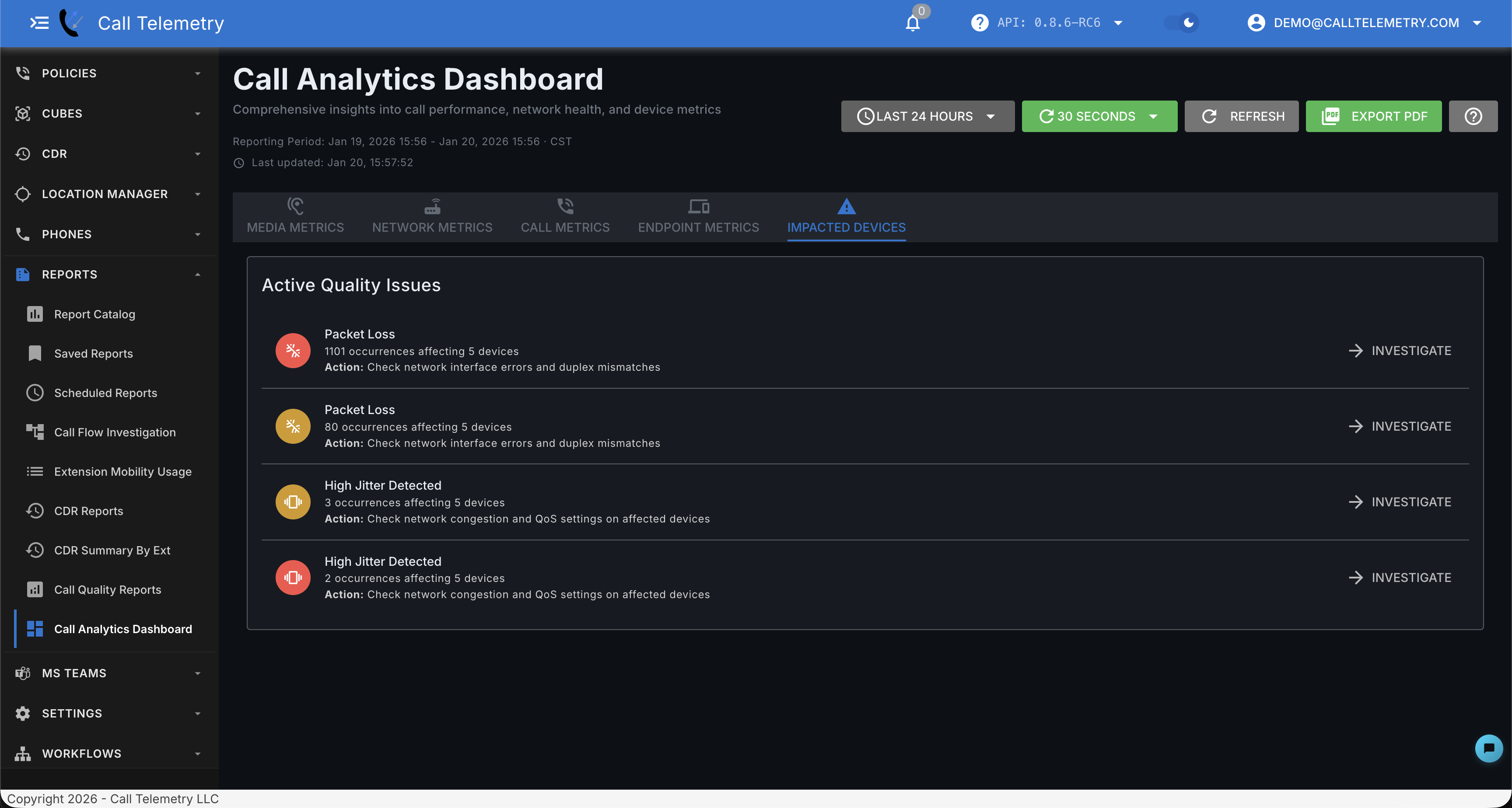 Active quality issues with recommended actions
Call Quality Reports - Full CMR table with quick filters, PDF export, and column customization:
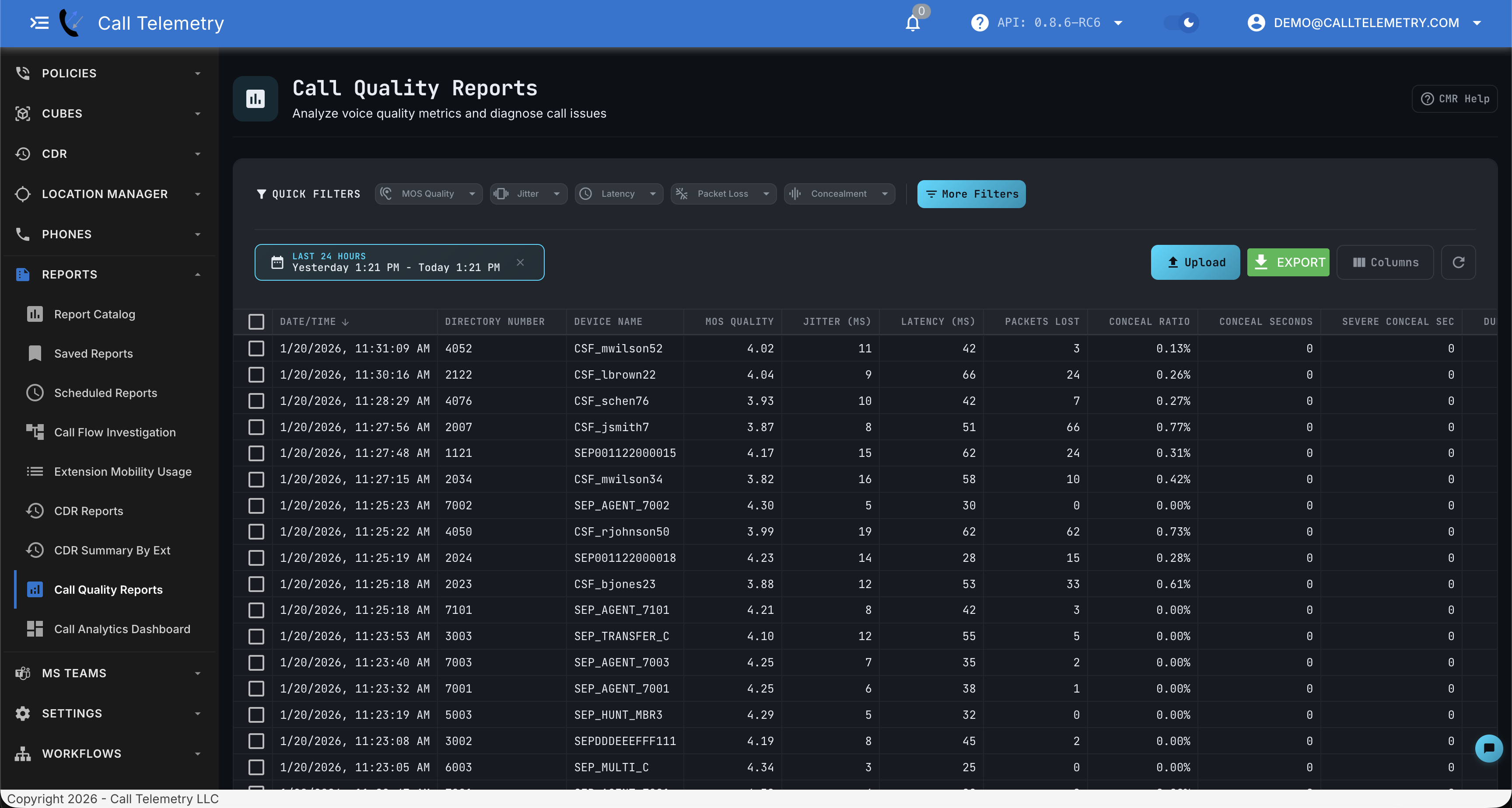 Detailed call quality records with filtering and export
Phone Dashboard
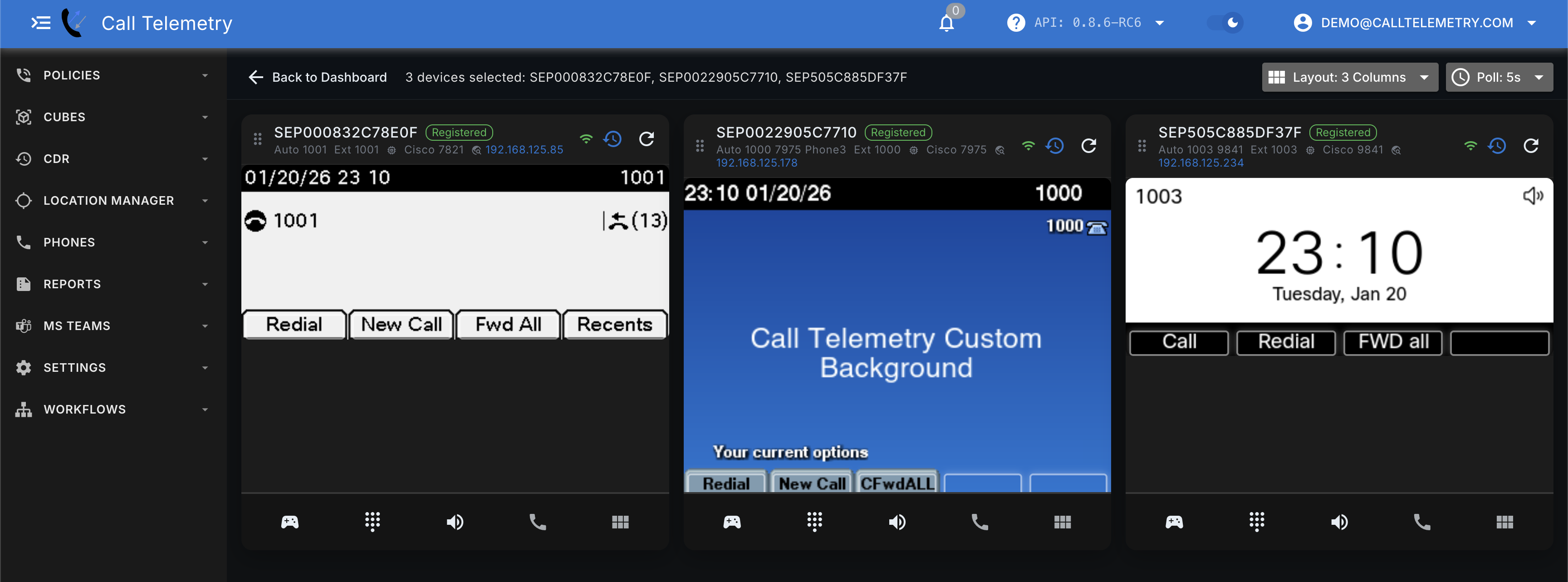
- New Table - New table structure with cool features - like per Column filtering, sorting, and even grouping.
- Multi Control - You can select multiple phones and remote control all of them. You can even drag them.
- Last Activity - New column showing last activity time for each phone. Last Inbound call, Last Outbound call, Last Registration time. You can now make decisions based on historical phone activity.
- Automatic Phone Purge - After AXL discovery, phones no longer in CUCM are automatically removed from the inventory to keep data synchronized. View purged phones in the Discovery Run dialog (Deleted stat card, Changes tab, and Logs tab).
- Deterministic RIS discovery - Full AXL+RIS+Extension Mobility orchestration with reconciliation stats and authoritative phone counts per discovery run.
- RIS Rate Limiting Settings - Advanced RIS Settings panel in CallManager configuration for fine-tuning discovery performance. Adjust seconds between RIS requests (4-60 seconds) and batch size; defaults were tuned for larger fleets (batch size 100→1000, pacing 10s→5s). Enforces the CUCM RISService70 rate limit (15 req/min max). A real-time calculation shows phones polled per minute based on your settings.
Reputation Reports
- Reputation Dashboard: Centralized view for all reputation metrics. Accessible to all license levels.
- New Charts Tab: Includes Reputation and Blocking Activity visualizations.
- Reputation Reports: Comprehensive set of new reports available. Full timezone support for reputation reports, as well as new time searching, and search by calling or called number.
CTI User Audit Wizard
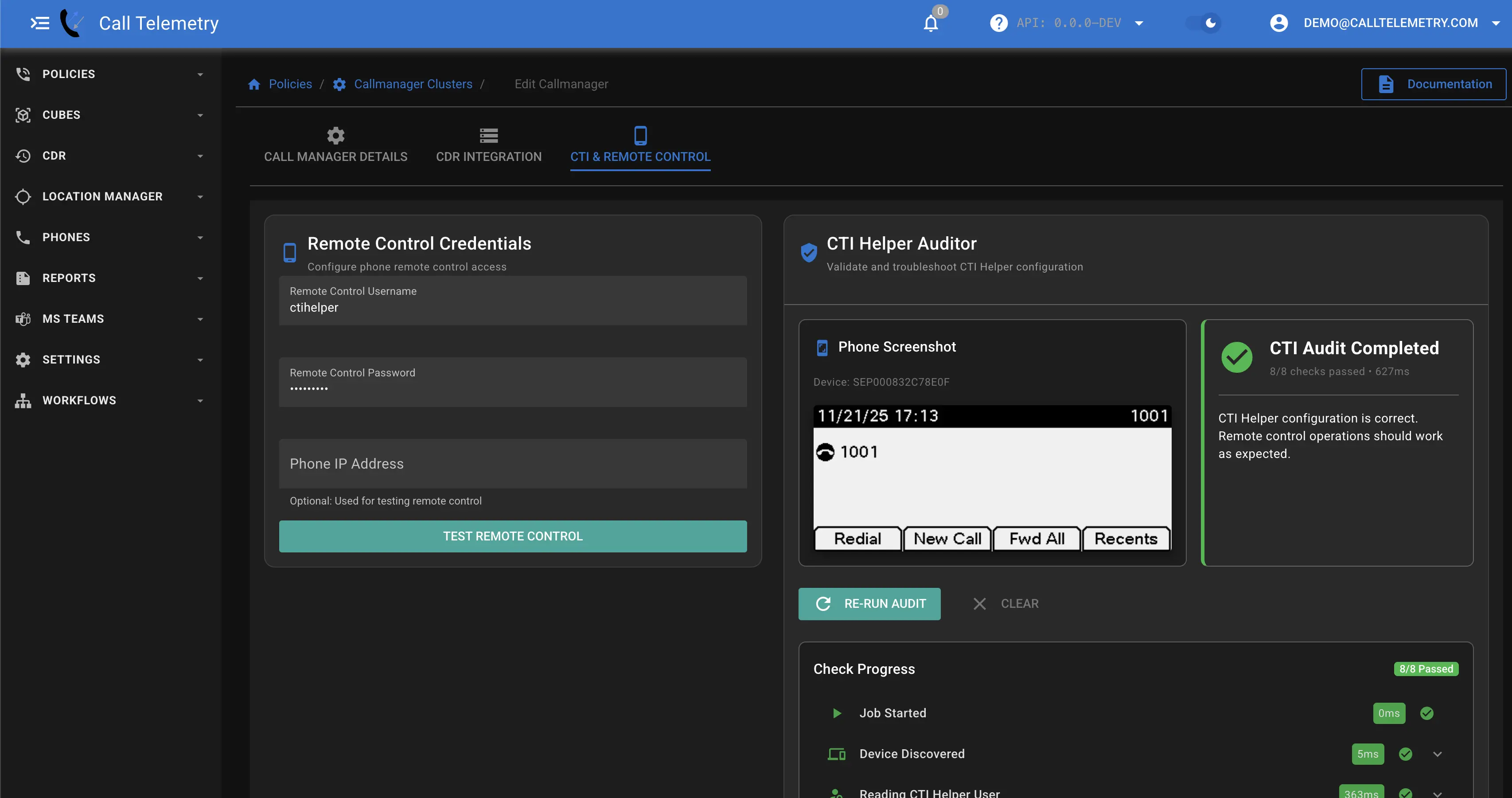
- New CTI Settings Wizard: CTI Setup page now has an audit settings, which audits the CTI User setup, roles and permissions, and optionally allows you to push changes to fix the user. It also auto associates phones, and attempts to resolve a phone to confirm remote control.
- JTAPI connection errors - Test-connection toasts now surface the actual API error message instead of a generic failure.
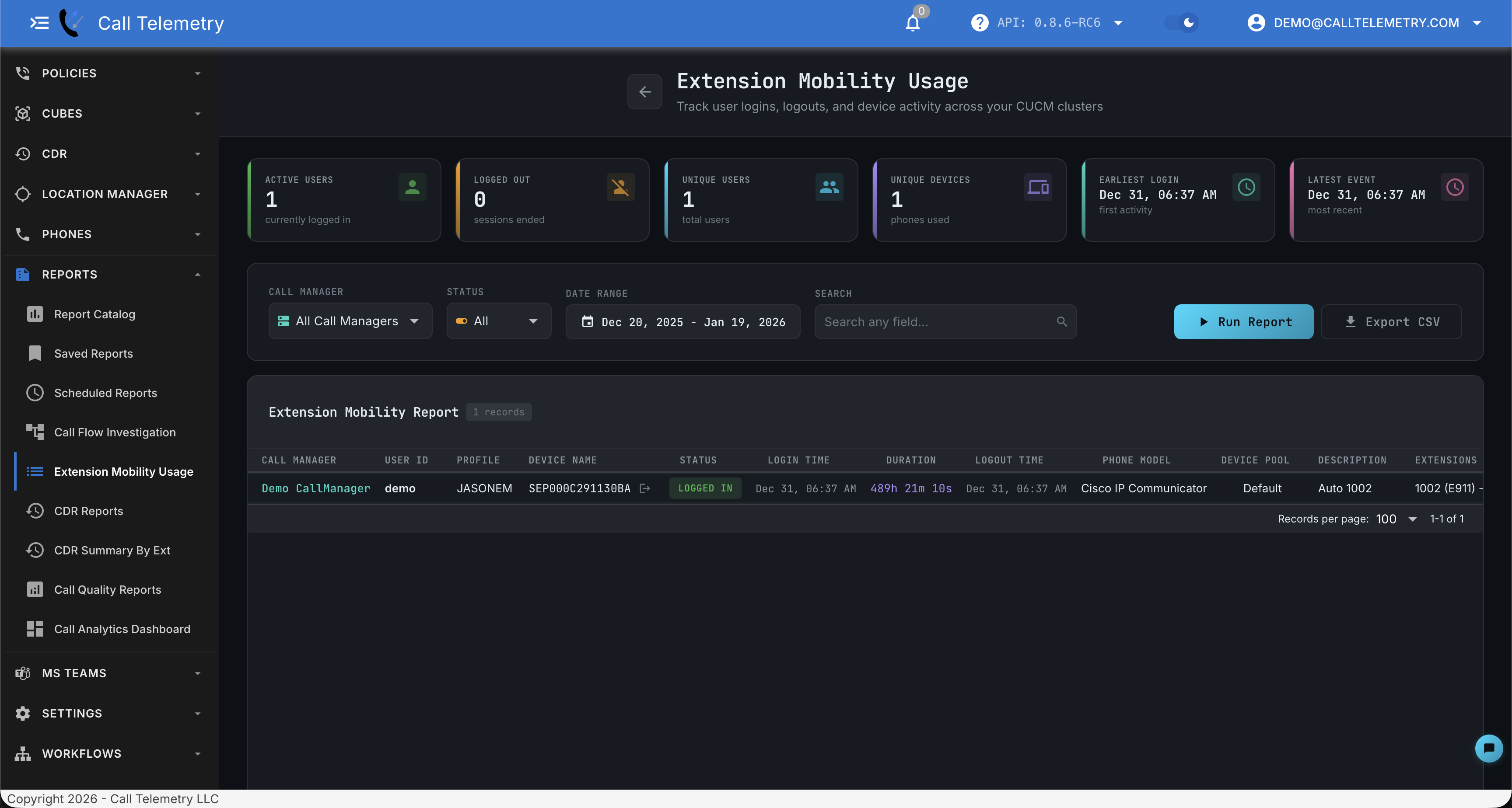
Extension Mobility Usage Report
- Completely rebuilt the usage report, showing new data of Extension Mobility like login time, log out time, and session duration, even the device logged in.
CSV Subnet Lookup App (Premium)
- Enhanced UX with dropdown of Subnet Apps, and Tooltips.
Pages Updates
Many pages were updated to accomplish a light UX refactor, and User Activity Logs:
- Numbers
- Tags
- End User
- Missed Calls
- Calling Devices
- Phone Dashboard
- Call Quality Analytics
- Call Quality Reports
- Top Callers CDR
- CDR Reports
- Policy Management
- Rule Management
- Cube Event Logs
- Cube Dashboard
- Extension Mobility Usage
- Administrators
- Callmanagers
- Data Retention
- Database Views
- Job History
- Location Report
General
- All pages are now cached for super fast navigation.
- Enhanced LDAP authentication - fixed token renewal and user ID mapping issue.
- Purge and background-job reliability - Reduced Oban maintenance-queue contention during heavy purges, fixed purge/CMR linker connection exhaustion, and improved purge-status reporting (
oldest_record_aton the fast path). - CDR ingest performance - CDR history query optimization, index tuning, batch inserts, and parser hot-path cleanup.
- Missed Call Alerts - Silenced duplicate log spam from repeated missed-call notifications.
Public Documentation New Pages or Updates
- HP Service Manager / SOAP App
- Subnet CSV Lookup App
- PostgreSQL CRM Integration
- Demo API App
- CUBE Webhooks
- Call Apps Overview
- Webhooks App
Minor releases
Current notes. What’s new ships in the changelog. This page is the 0.8.6 feature announcement. To update an appliance, follow the upgrade guide.
Small, reviewed hotfixes shipped off the 0.8.6 stable baseline.
Patch releases after 0.8.6.1 are listed on the release timeline, one page per Stable build.
May 14, 2026 (0.8.6.1)
This release establishes the 0.8.6 stable patch line by re-tagging the validated 0.8.6-rc99 build. Appliances on that release candidate pull identical images; the bullets below are the last incremental changes that shipped on the RC line before the stable cut (now documented under the stable version instead of per-RC headings).
- Feat: UC Analytics Dashboard and Shared Wallboard Links — see the GA sections above for full detail.
- Feat: Phone Registration Health report template — five-category registration health across clusters (see CDR Reporting above).
- Feat: Deterministic RIS discovery pipeline with full AXL+RIS+Extension Mobility orchestration, reconciliation stats, and tuned default batching.
- Feat: Configurable block-greeting toggle with org-level control.
- Perf: CDR history query optimization, index tuning, and batch inserts.
- Fix: JTAPI test-connection toasts show actual API error messages.
- Fix: Reduced Oban maintenance-queue contention during heavy purges; resolved purge and CMR linker connection exhaustion; improved purge-status
oldest_record_aton the fast path. - Fix: Scoped RIS batching per CallManager with SSE pacing; enforced CUCM RISService70 rate limit (15 req/min max).
- Fix: Silenced missed-call duplicate log spam.
- Refactor: CDR parser cleanup — removed dead code and fixed DB lookups on the hot path.