E911 Phone Discovery App for Emergency Location Services
Collect the calling phone's device and network details, then match them to maintained address records for your emergency notifications.
Feature Overview
Phone Data Discovery uses the calling device name from a policy event to query Cisco CallManager registration data. For supported Cisco IP Phones, it also reads available neighbor and subnet data from the phone's web interface. The result can supply context to other configured apps and alert templates.
Discovery identifies a network attachment. The civic address comes from your Location Database; discovering a switch or port does not establish a street address by itself. App execution and notification timing depend on the configured workflow, not on receipt of a completed-call CDR.
Feature Requirements
- Call Telemetry Appliance with a Premium license for E911 and call-policy apps.
- Cisco CallManager integration with working RIS access and the required device inventory.
- External Call Control inspection on the intended call path, with the calling device name present in the request. Cisco added this field to the 11.5 line in 11.5(1)SU3, build 11.5.1.13900-42.
- Supported Cisco IP Phones with web access enabled and reachable from the appliance for phone-web discovery.
- Address mappings when you need a civic address, and location-management permission to edit those mappings.
Best Practices
Start with one known phone and a maintained switch, port, or subnet mapping. Inspect its app result in Call Test before using that result in an alert template. Include a clear fallback message when no usable address is returned.
Keep the existing CUCM or Cisco Emergency Responder route in place. This app supplies discovery context; it does not replace your emergency-routing configuration or verify a remote caller's physical location.
Discovery Process
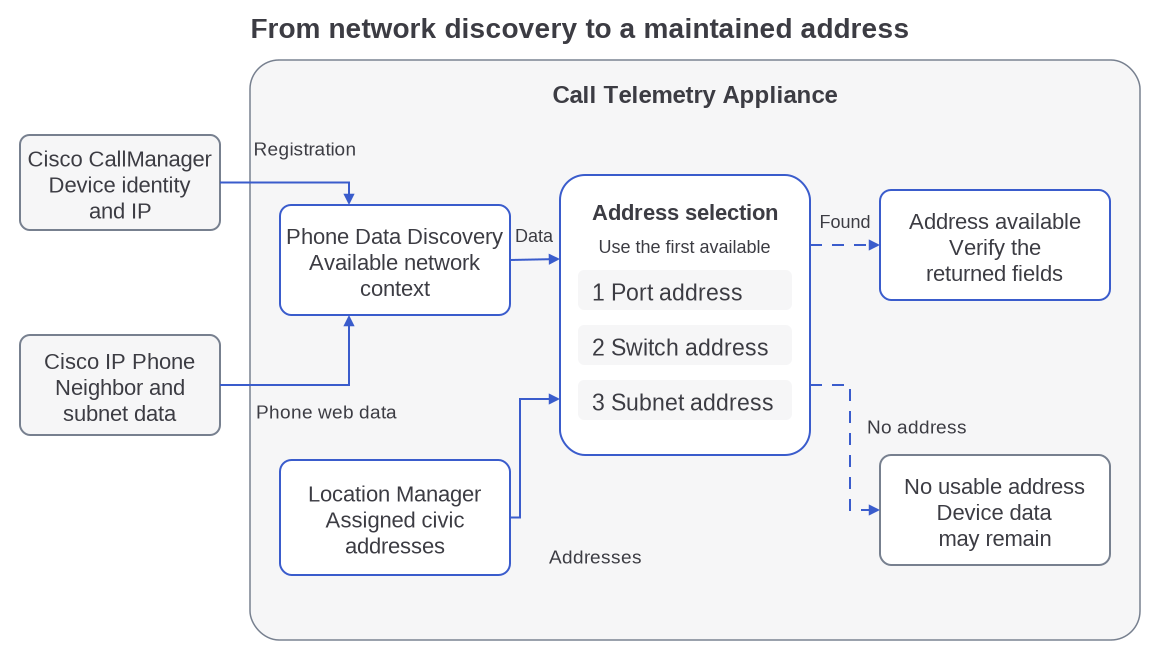
The default 0.8.6 workflow gathers available device/network data, then selects an address from the matching local records.
| Stage | What Happens |
|---|---|
| Registration | Query RIS using the event's calling device name to obtain available device status and IP data. |
| Phone web data | For supported phones, read neighbor and subnet information. Availability depends on the phone and network configuration. |
| Network hop | Use the discovered neighbor where available. A traceroute fallback may be attempted when neighbor data is missing and a phone IP is available. |
| Hostname processing | Apply the enabled transformations to the reported network-hop hostname. |
| Address selection | Use the matching port address, otherwise switch address, otherwise subnet address. Without a usable mapping, no civic address is established. |
| App result | Return available phone, network, and location fields. Additional inventory fields are included when available. |
Integration with Call Telemetry E911 Location Objects
Default Address Selection
The default Phone Data Discovery address path selects port → switch → subnet. A discovered record needs an associated address to supply the civic-address result. A switch or port name alone is useful network context, not an address match.
Direct phone assignments are separate from this default network-address selection. The Location Lookup app can prefer a direct phone address, and Phone Location Reports assembles its displayed address separately. Do not assume that an address shown in the inventory report is the address a particular call app will return.
Location Match Field
Inspect both the returned location.address and location.address_text. The match field identifies the pipeline's selected match, but is not proof of physical accuracy or a universal hierarchy shared by every lookup app.
Building E911 Location Data
Maintain civic addresses and their subnet, switch, and port associations in Location Manager. Use the import controls available on the relevant page for bulk records. QR surveys let someone at a supported phone confirm or update recorded details; scanning a QR code does not independently determine a room or street address.
App Configuration
Create a Phone Data Discovery app, associate it with the intended policy rule, and verify the data available to subsequent apps or notifications. Follow Getting Started with Apps for app placement and ordering.
Configuration Parameters
All four hostname transformations default to false. Enable only the transformations your reported network-hop names need.
| Parameter | Transformation | Example with This Option Alone |
|---|---|---|
transform_hostname_strip_domain | Keep the text before the first period. | switch-01.example.com → switch-01 |
transform_hostname_upcase | Convert to uppercase. | switch-01 → SWITCH-01 |
transform_hostname_strip_vlan | Keep the text before the first underscore. | switch-01_vlan100 → switch-01 |
transform_hostname_within_parens | Extract the first parenthesized value, when present. | device(rack-a-01) → rack-a-01 |
Hostname Transformation Examples
Enabled transformations run in this order: strip domain → uppercase → strip underscore suffix → extract parentheses. Earlier steps can remove text that a later step would otherwise use.
For switch-01_vlan100.example.com(rack-a-01), enabling all four produces SWITCH-01, not RACK-A-01. Test the actual hostname and inspect next_hop.hostname; these options do not change the phone's device name or create an address mapping.
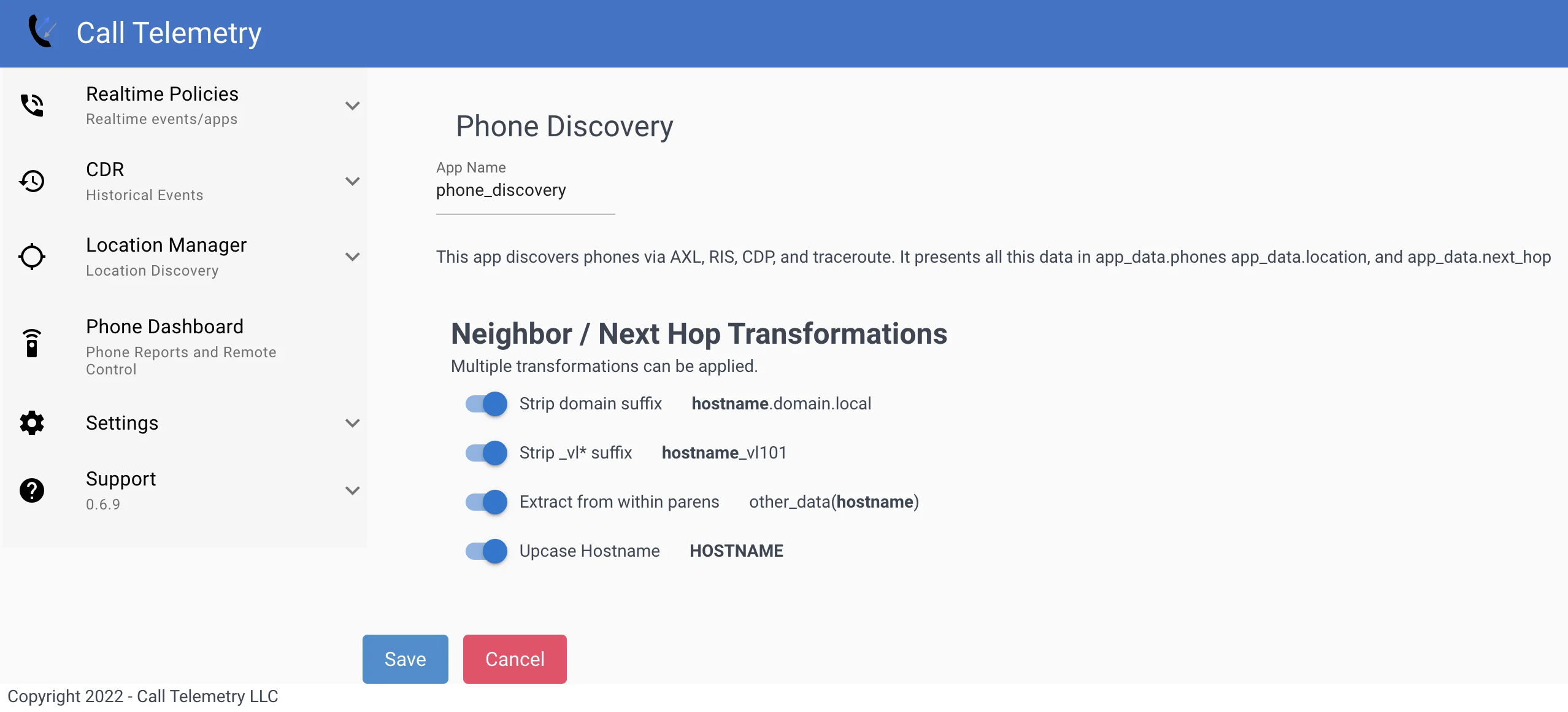
The screenshot shows the transformation controls in an earlier interface. The parameter table above describes the 0.8.6 behavior and defaults.
Stacking with Other Apps for More Location Data
Use additional apps when the discovery result needs context from another maintained source:
| App | Use It For |
|---|---|
| Subnet CSV | Match a discovered subnet to configured CSV address or custom fields. |
| ServiceNow CMDB | Query a matching CI and optionally its linked location record. |
| Webhook | Make a configured REST request to an inventory service, such as NetBox or an internal API. |
| SOAP Query | Query a compatible inventory service through a configured SOAP request. |
These are configured enrichment steps. Their returned fields do not automatically update the local Location Database. Inspect each app's output and confirm that the selected fields exist when your alert template runs.
App Response Structure
The result contains a status/message and a data object with the available discovery fields. This fictional, abbreviated example shows only selected fields from an address-bearing result:
{
  "result": "success",
  "message": "Phone Discovery App completed.",
  "data": {
    "phone": {
      "device_name": "SEP001122334455",
      "ip": "192.0.2.20"
    },
    "location": {
      "address_text": "100 Example Avenue, Example City",
      "match": "port"
    }
  }
}
Data Fields Explained
| Field | Meaning When Available |
|---|---|
phone | Device identity, registration, IP and other available phone details. |
neighbor | Discovered neighbor name, IP and port data. |
next_hop | Network-hop data, including the transformed hostname. |
subnet, subnet_ipv4, subnet_ipv6 | Available subnet context; do not assume every field is populated. |
location.address | The selected address record, rather than a formatted address string. |
location.address_text | The formatted text derived from that address record. |
location.near | Nearby-location text when provided by the matched records. |
location.port, location.switch, location.subnet | Matched records, not just display names. |
location.match | The pipeline's selected-match indicator. Check the address fields too. |
Use the actual app result and template variable picker rather than assuming every phone model returns the same payload.
Error Handling and Response Types
| Observed Result | What to Check |
|---|---|
| Device/network data, but no usable address | Review the matching local records and their address associations. A successful app status alone does not establish a civic address. |
| Missing calling device name | Inspect the policy event, CUCM version and ECC placement. An extension alone is not the discovery identifier. |
| Missing or failed network-hop data | Check registration, appliance-to-phone reachability, web access and the available neighbor data. |
| Unexpected address or hostname | Inspect the app output, transformation options and stored mapping used by that workflow. |
After a change, repeat Call Test and inspect the rendered notification. Keep the E911 overview and setup guide as the end-to-end reference.