Deploy Call Telemetry on K3s
Call Telemetry can run on a single K3s server or on a multi-server cluster. A single-server cluster is a valid deployment, but it has one control-plane failure domain. For an embedded-etcd high-availability control plane, K3s requires at least three server nodes with an odd node count. Application and database availability depend on their own replica, scheduling, storage, and failover configuration.
Supported Deployments
- Onprem: Call Telemetry uses K3s.io A lightweight Kubernetes distribution designed for easy installation and operation of Kubernetes.
- Cloud: Any cloud provider that supports Kubernetes. Our preferred providers with deployments are Digital Ocean, AWS, and Azure.
Deployment and Version Control
Helm charts and Kubernetes manifests are maintained in the Call Telemetry Kubernetes charts repository. Follow its current installation guide for the chart source, version, and values supported by your deployment.
Support
Kubernetes Clustering is free to use on your own, but no support is provided without a paid support license. Please contact Support for more information.
Availability and Isolation
A single-server deployment has no control-plane failover. An embedded-etcd cluster with at least three server nodes can keep the K3s control plane available through a node failure when it retains quorum. This does not by itself make Call Telemetry application pods or PostgreSQL highly available; confirm their replicas, placement, storage, and failover settings in the current charts.
A cluster can host development and production namespaces, but those namespaces share cluster-level failure domains and capacity. Use separate clusters when the environments need independent control planes or stronger failure isolation.
Environment Boundaries and Failure Domains
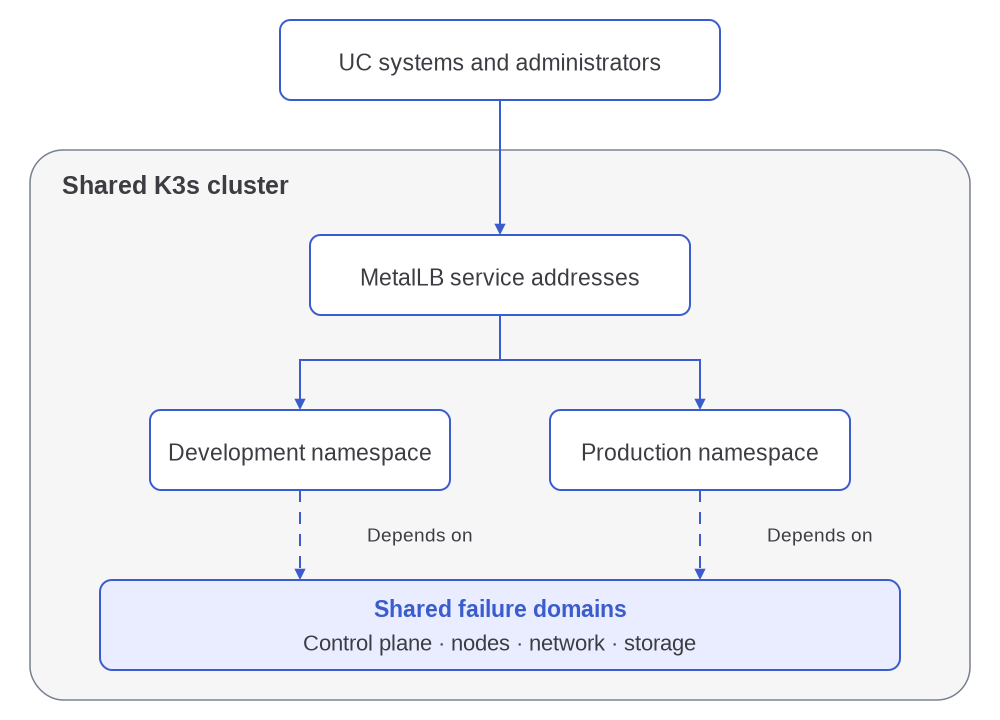
Namespaces and separate Service IPs provide logical boundaries and distinct traffic entry points; they do not isolate the control plane, nodes, network, storage, or cluster-wide services. MetalLB assigns Service addresses. It does not provide application or database failover by itself.
Deployment Components
- K3s servers: One server is non-HA. Embedded-etcd HA uses at least three server nodes with an odd count.
- MetalLB: Provides external IP addresses for Kubernetes
LoadBalancerServices. It is one shared cluster component, not the only shared resource. - PostgreSQL: Database availability is configured separately from K3s control-plane availability. Use the current chart documentation for supported database topology and storage requirements.
Installation Steps
OS Preparation
This step configures the firewall, and installs some tools needed for running Kubernetes.
Supported OS Versions
- AlmaLinux 9.x
- RHEL 9.x
- CentOS Stream 9.x
sudo curl https://get.calltelemetry.com | sudo sh -s -- prep-cluster-node
K3s Installation
K3s is a lightweight Kubernetes distribution designed for easy installation and operation of Kubernetes.
Setting Up the First Server Node
-
Install K3s Install K3s on the first server. This initializes the embedded-etcd datastore. If you do not set a token, K3s generates a server token for nodes that join later.
# From the first server node.curl -sfL https://get.k3s.io | sudo env K3S_KUBECONFIG_MODE=0600 sh -s - server --cluster-init --disable traefik --disable servicelbThis command initializes the K3s server, disables Traefik (a default ingress controller), and the default service load balancer.
-
Configure Kubectl Set up
kubectl, the command-line tool for interacting with the Kubernetes cluster. The kubeconfig grants cluster administrator access, so keep the copied file readable only by your user:# From the first server node.mkdir -p ~/.kubesudo cat /etc/rancher/k3s/k3s.yaml > ~/.kube/configchmod 600 ~/.kube/config
Adding Server Nodes for Control-Plane HA
You can stop after the first server for a single-server cluster, but that cluster is not highly available. To use embedded-etcd HA, join at least two additional server nodes so the cluster has an odd count of at least three. Agents can add workload capacity but do not add control-plane redundancy.
For additional servers, retrieve the generated server token from /var/lib/rancher/k3s/server/token on the first server and transfer it through your secure secret-handling process. The server token grants cluster-join authority; keep it private and use the same value on every server.
-
Install K3s on Secondary Nodes Join each additional server to the cluster with the first server's address and generated token.
# From each additional server node.export primary_ip="<first-server-ip>"export K3S_TOKEN="<secure-server-token-from-first-server>"curl -sfL https://get.k3s.io | sudo --preserve-env=K3S_TOKEN env K3S_URL="https://$primary_ip:6443" K3S_KUBECONFIG_MODE=0600 sh -s - server --disable traefik --disable servicelbmkdir -p ~/.kubesudo cat /etc/rancher/k3s/k3s.yaml > ~/.kube/configchmod 600 ~/.kube/configChecking Nodes
# From any node.[calltelemetry@ct-node-1 ~]$ kubectl get nodeNAME STATUS ROLES AGE VERSIONct-node-1 Ready control-plane,etcd,master 34h v1.29.6+k3s2ct-node-2 Ready control-plane,etcd,master 33h v1.29.6+k3s2ct-node-3 Ready control-plane,etcd,master 34h v1.29.6+k3s2[calltelemetry@ct-node-1 ~]$ -
Scale DNS Pods Adjust DNS pod replicas to match the number of total nodes. This helps with failover.
# From any node.kubectl scale deployment.v1.apps/coredns --replicas=3 -n kube-systemCheck DNS Pod Scale
# From any node.[calltelemetry@ct-node-1 ~]$ kubectl get pods -A | grep dnskube-system coredns-6799fbcd5-2v68f 1/1 Running 0 13mkube-system coredns-6799fbcd5-55mdh 1/1 Running 0 13mkube-system coredns-6799fbcd5-6skkc 1/1 Running 2 (<invalid> ago) 34h[calltelemetry@ct-node-1 ~]$
Application Deployment
Use the current Kubernetes charts repository for installation and upgrade instructions. Chart names, versions, and values are maintained there and can change independently of this topology guide.
Troubleshooting
Uninstall K3s
To uninstall K3s, use:
# Node to be uninstalled.
/usr/local/bin/k3s-uninstall.sh