Create a Cisco CUCM Voice Quality Alert
PremiumThe Voice Quality Degradation preset evaluates linked CMR measurements after Call Telemetry associates them with the corresponding CDR. It can match either reported listening MOS or synthetic MOS below an editable starting point.
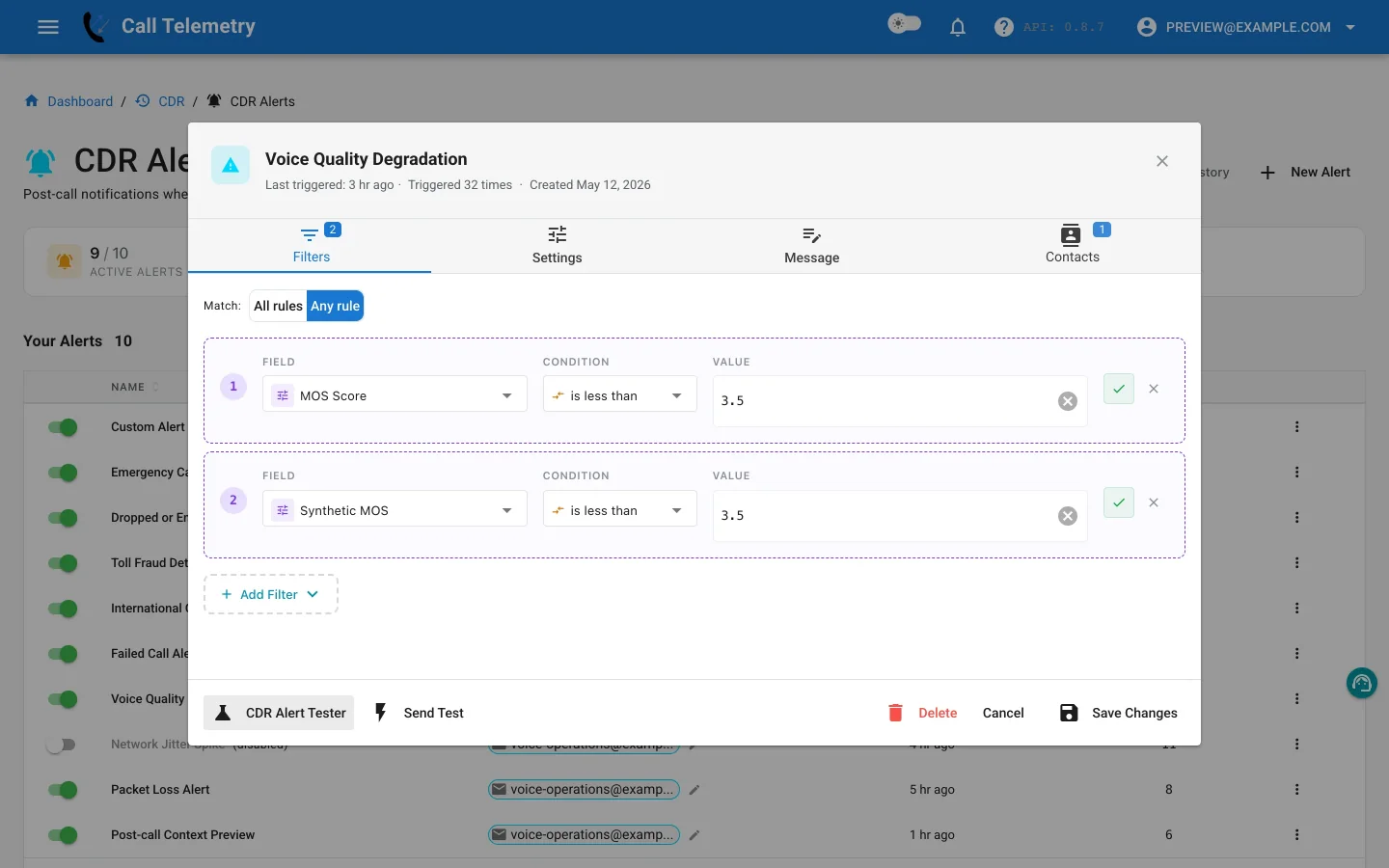
Choose the preset
Open Alerts → CDR Alerts → New Alert and choose Voice Quality Degradation. Confirm CMR ingestion and linking are producing measurements in CMR reports before relying on the profile.
Inspect the Any-mode rules
At least one rule must match:
| Field | Operator | Preset starting value |
|---|---|---|
mos_listening_quality | less_than | 3.5 |
synthetic_mos | less_than | 3.5 |
The 3.5 values are editable preset defaults, not universal Cisco requirements. Compare them with your endpoints, codecs, network baseline, and service objectives.
Any mode lets either available MOS measurement trigger the profile; All mode would require both measurements below their thresholds.
CMR-aware profiles currently use a 15-minute cooldown after a trigger. That limits repeated notifications for a persistent quality condition.
Build a diagnostic message
Include both MOS values plus jitter, latency, inferred packet loss, codec, device, caller, called number, duration, and available phone location. That context helps recipients distinguish a single poor call from a device, site, or network pattern; use CMR reports to analyze the broader result set.
Test, activate, and review
- Add voice or network operations contacts.
- Use Send Test for delivered email and channel previews.
- In Alert Lab, place either MOS value below the configured threshold, then test a record where both values are above it. Email, Teams, and Webex can be delivered; SMS and webhook are safety-skipped.
- Activate the profile and review History after linked CDR/CMR processing completes.
- Tune the threshold or routing if history shows expected endpoint variation rather than actionable degradation.
Return to the CDR Alerts overview or analyze quality trends in CMR reports.