Alert on Dropped or Emergency Calls
PremiumThe Dropped or Emergency Call Alert preset combines two post-call signals in one profile: selected network or media disconnect causes, and calls to configured emergency numbers.
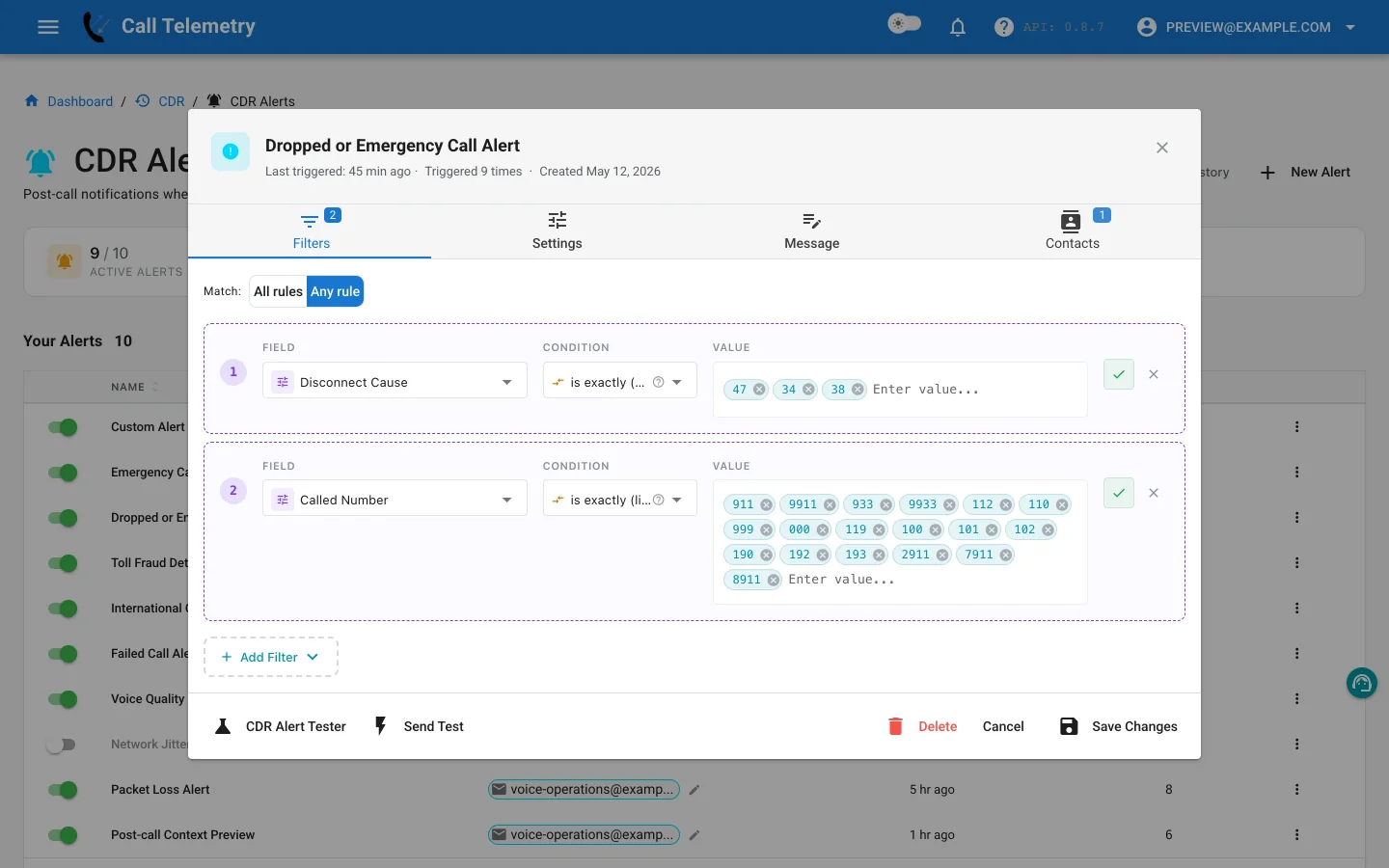
Choose the preset
Open Alerts → CDR Alerts → New Alert, then choose Dropped or Emergency Call Alert. Inspect the Critical severity and the contacts before enabling the profile.
Understand the Any-mode rules
The preset uses Any matching. At least one of these rules must match:
| Field | Operator | Default value |
|---|---|---|
destCause_value | in_list | 47, 34, 38 |
finalCalledPartyNumber | in_list | Configured emergency-number list |
Cause 47 represents a resource-unavailable condition, 34 no circuit or channel available, and 38 network out of order. Confirm how those causes appear in your call paths before adding or removing codes. The second rule matches an emergency number independently of the cause.
Because the mode is Any, changing it to All would materially change the preset: the alert would then require both an included cause and an emergency number on the same record.
The combined preset may be inappropriate when emergency calls route to a safety team while network or media failures route to a NOC. In that case, create separate profiles with distinct messages, severities, contacts, and escalation expectations.
Customize context and contacts
Keep the destination cause, calling and final called numbers, duration, device, and available phone location in the message. Add only contacts who can interpret both branches of the Any rule, or split the profile as described above.
Test and activate
- Use Send Test for delivered email and previews of the other channels.
- In Alert Lab, test one synthetic record with cause
34,38, or47and an ordinary number. - Test a second record with a configured emergency number and a normal disconnect cause.
- Confirm an ordinary completed call does not match. Alert Lab can deliver email, Teams, and Webex; SMS and webhook remain safety-skipped.
- Save and activate the profile, then review History for the matched branch, grouped records, message, and channel result.
Return to the CDR Alerts overview or use the focused Emergency Call Alert.